Return to the Financial Consolidation Model Overview
The Financial Consolidation model includes two time-related dimensions (Month_YTD and Day) which define the reporting periods and enable time-based analysis. These dimensions can be customized to match your organization’s historical data range and planning horizon using the Time Editor. The Time Editor provides an efficient way to create and configure time-based dimensions by allowing users to define hierarchy levels (such as years, quarters, and months) and other time settings. In addition to generating the hierarchical structure, it automatically creates attributes that store key contextual information for each time element, such as start and end dates or period types.
Month_YTD Dimension:
The Month_YTD dimension stores financial data at a monthly level of granularity, with all values recorded on a Year-to-Date (YTD) basis — accumulating figures from the start of the fiscal year up to the end of each month. This dimension is managed through the Time Editor and serves as a core component of the Financial Consolidation model, ensuring accurate aggregation and reporting.
Hierarchy Restrictions:
To maintain consistency, ensure accurate time aggregation, and prevent calculation errors, the Month_YTD dimension must follow specific hierarchy configuration rules. The following settings outline the required limitations.
-
Current-Year Hierarchies (YTD, YTG, QTD, QTG): Not valid for YTD dimensions.
-
Rolling Months: Must be turned off.
-
Full Parallel Hierarchies: Not yet supported — keep this option disabled.
Note that you must always ensure that the configuration of the Month_YTD dimension is consistent with the Day dimension to avoid discrepancies in time-based calculations and reports.
Month_YTD Dimension – Configuration Guidelines
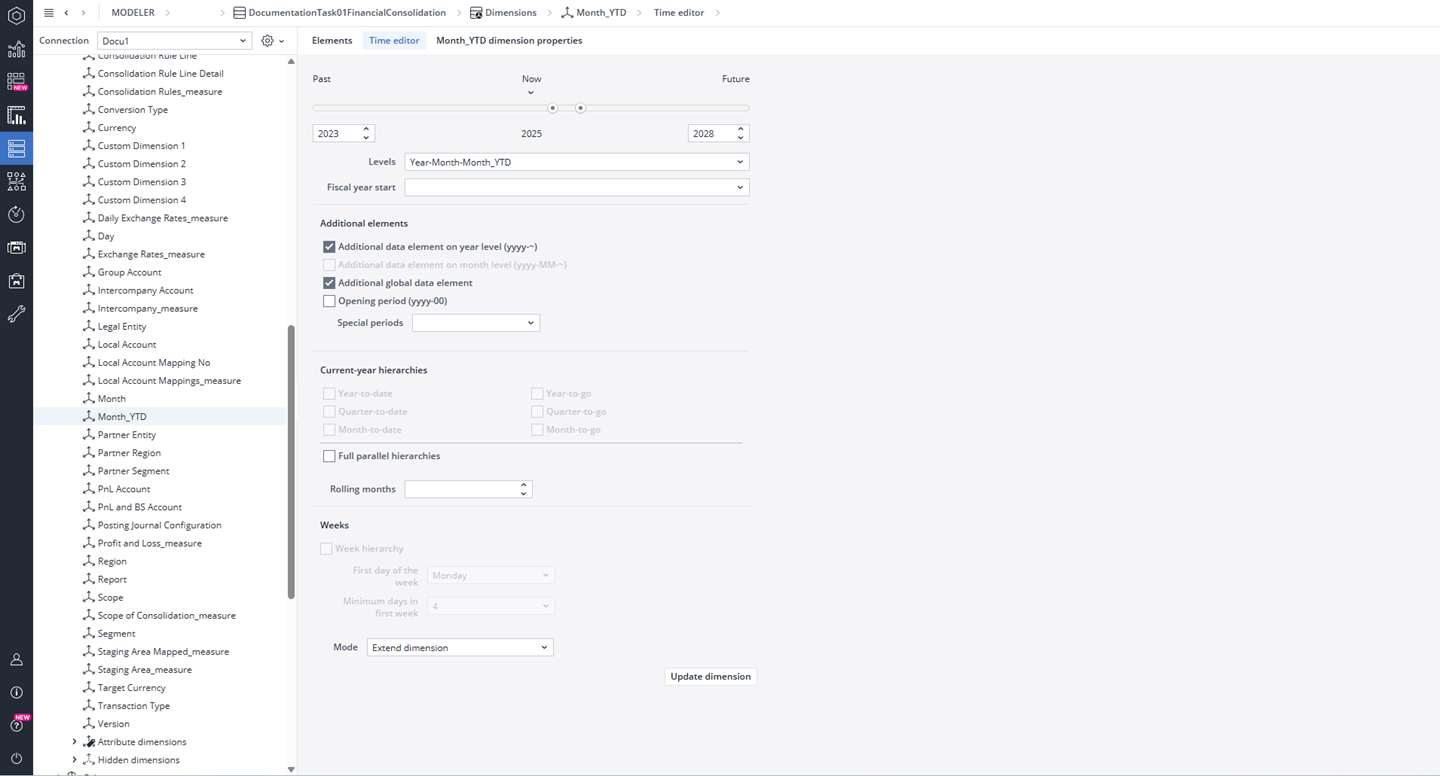
As shown in the screenshot, the Time Editor for the Month_YTD dimension should be configured with the following specifications.
| Settings | Details |
| Past | Should include at least 1 year before the current year containing actuals. |
| Future | Should include at least three years after the current year containing actuals. |
| Levels |
Supported hierarchies:
|
| Fiscal Year Start | Can be Empty or set to January (for calendar year Jan–Dec). Other months define custom fiscal years. |
| Additional Data Element on Year Level | Mandatory. |
| Additional Global Data Element | Mandatory. |
| Opening Period | Must be turned off. |
| Special Periods | Optional – any configuration is accepted based on reporting needs. |
Day Dimension
The Day dimension stores financial data at a daily level of granularity, enabling precise time-based aggregation and detailed reporting. It is created and maintained through the Time Editor and plays a vital role in ensuring accurate consolidation results.
Consistency between the Day and Month_YTD dimensions is essential for reliable time-based calculations and reporting, and consistency across consolidation results. Therefore, always ensure that the Day dimension settings are fully aligned with the Month_YTD dimension to maintain consistency across consolidation results.
Day Dimension – Configuration Guidelines
The Time Editor for the Day dimension should be configured with the following specifications.
| Settings | Details |
| Past | At least 1 year before current actuals year; must match or go further than Month_YTD |
| Future | At least 3 years ahead of current actuals year; must match or exceed Month_YTD |
| Levels | Year-Month-Day or Year-Quarter-Month-Day |
| Fiscal Year Start | Can be Empty or set to January (for calendar year Jan–Dec). Other months define custom fiscal years. |
| Additional Data Element on Year Level | Mandatory |
| Additional Global Data Element | Optional |
| Opening Period | Optional |
| Special Periods | Optional – any configuration is accepted based on reporting needs. |
Day Dimension – Hierarchies & Weeks
The table below outlines the available hierarchy types, their configuration requirements, and the corresponding week settings. Mandatory hierarchies (such as Year-to-Date and Year-to-Go) ensure that daily data integrates correctly into the consolidation model, while optional hierarchies can be enabled as needed to support additional analytical views.
| Hierarchy | Requirement | Week settings | Requirement | |
| Year-To-Date (YTD) | Mandatory | Week Hierarchy | Optional | |
| Year-To-Go (YTG) | Mandatory | First Day of Week | Optional (any value is valid) | |
| Quarter-To-Date (QTD) | Optional | Min. Days in Week | Optional (any value is valid) | |
| Quarter-To-Go (QTG) | Optional | |||
| Month-To-Date (MTD) | Optional | |||
| Month-To-Go (MTG) | Optional | |||
| Rolling Months | Optional |
Updated October 5, 2026