Return to the Financial Consolidation Model Overview
Defining the scope of consolidation (the list of companies to be incorporated in the preparation of consolidated accounts) is the first critical pre-configuration step in the consolidation process.
In configuring the Scope of Consolidation for Financial Consolidation, three key dimensions must be set up.
-
Legal Entity Dimension
-
Partner Entity Dimension
-
Scope Dimension
To find these dimensions, navigate to the Modeler and open your Financial Consolidation model instance.
Glossary:
-
A group consists of multiple legally independent companies that operate under a unified management structure.
-
Together, a parent company and its subsidiary form an economic unit.
-
In the Financial Consolidation model, individual companies are categorized as legal entities, and group companies are categorized as partner entities.
 Legal Entity Dimension
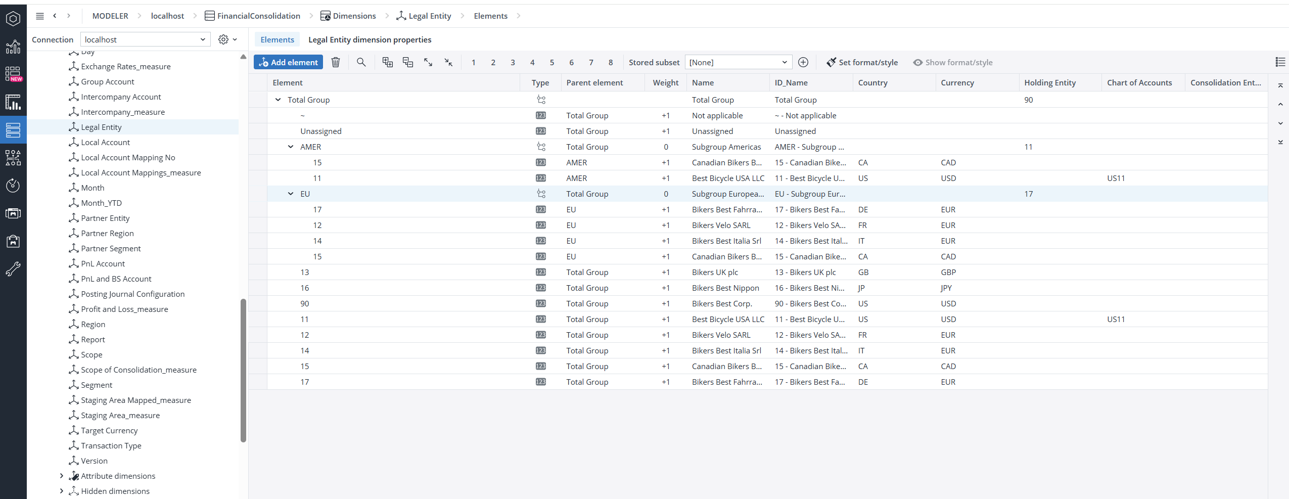
The Legal Entity dimension defines the individual companies within a corporate group that prepare their own financial statements. Each legal entity represents a distinct organizational unit included in the consolidation process. All entities must ultimately roll up to the Total Group element—either directly or through intermediate levels such as regional or functional subgroups (e.g., EU or AMER). The number of legal entity elements in this dimension determines how many entities are included in the overall consolidation scope.
Special Elements in the Legal Entity Dimension
In addition to standard company elements, the Legal Entity dimension includes several special elements designed to handle exceptions or unclassified data during the consolidation process. These elements ensure that all data is captured, even if certain records are incomplete or not yet assigned to a specific entity.
-
~ (Not Applicable): Used for data that does not belong to any legal entity. This element serves as a placeholder, sometimes referred to as a dummy element.
-
Unassigned: Automatically created when imported data references an entity that does not exist in the current dimension. These elements temporarily store unrecognized data and should be reviewed and reassigned to the appropriate parent entity during the data validation phase.
Do not remove the Total Group, ~, or Unassigned elements, as they are crucial for the report's functionality.
Key attributes
The following are the key attributes of the Legal Entity dimension:
| Attribute | Description |
| Name | Display name shown in reports. Supports localized translations. (String) |
| ID_Name | Combination of element name, a dash (“ - "), and the localized name attribute. (calculated, string) |
| Country | ISO 3166 two-letter country code of legal entity (e.g., US). (String). For aggregated elements, assign a country code only if all child entities share the same country. Leave it blank if countries are mixed. |
| Currency | ISO 4217 currency code (e.g., USD). (String). For aggregated elements, assign a currency code only if all child entities share the same currency. Leave it blank if currencies are mixed. |
| Sign Standard | Defines how financial figures are stored in source systems. It’s a 4-character string (+ or -) indicating the sign for: Assets, Liabilities, Income, Expenses (e.g., +--+ in SAP). Enables automatic sign reversal during data import by comparing with model settings. |
| Holding Entity | Used to group entities under a holding company (parent-child relationship). If changed, update related rule templates accordingly. |
| Chart of Accounts | Currently reserved for future use. |
| Consolidation Entity | Flags artificial entities for consolidation within a group. Note: Not recommended by Jedox and not used in sample data. |
Partner Entity Dimension
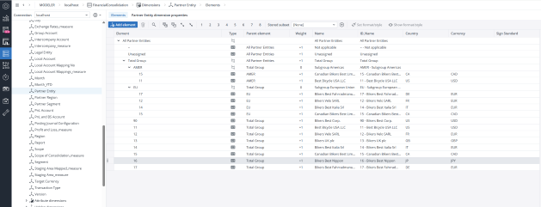
The Partner Entity dimension defines the intercompany relationships within the group, capturing transactions between affiliated legal entities. All internal partner entities ultimately roll up to the Total Group element—either directly or through intermediate subgroups such as EU or AMER (as shown in the sample data). The root element of this dimension is All Partner Entities, which serves as the consolidated parent for all intercompany partners.
Special Elements in the Partner Entity Dimension
The Partner Entity dimension also includes special elements that manage exceptions and ensure completeness of intercompany data during import and consolidation. These elements act as placeholders for records that lack a defined partner relationship or reference unknown entities.
-
~ (Not Applicable): Used for data that does not include a partner-level breakdown or relates to external partners outside the consolidation group.
-
Unassigned: Automatically created when imported data references partner entities not found in the current dimension. These elements serve as temporary placeholders and should be reviewed and reassigned to the correct partner entity after data validation.
Do not remove the Total Group, ~, or Unassigned elements, as they are crucial for the report's functionality.
Hierarchy and Weight Rules
To ensure consistent intercompany reporting and proper alignment with the Legal Entity dimension, the Partner Entity dimension must follow specific hierarchy and weighting rules:
-
Subgroup elements must always have a weight of 0.
-
The hierarchy structure (including base elements and subgroups) must mirror the structure of the Legal Entity dimension.
-
Each legal entity within a subgroup must also appear as a direct child of both the Total Group element and its corresponding subgroup.
Note that if these rules are not followed, dependent reports, calculations, or consolidation processes may not function correctly.
Key attributes
The following are the key attributes of the Partner Entity dimension:
| Attribute | Description |
| Name | Display name shown in reports. Supports localized translations. (String) |
| ID_Name | Combination of element name, a dash (“ - "), and the localized name attribute. (calculated, string) |
| Country | ISO 3166 two-letter country code of legal entity (e.g., US). (String). For aggregated elements, assign a country code only if all child entities share the same country. Leave it blank if countries are mixed. |
| Currency | ISO 4217 currency code (e.g., USD). (String). For aggregated elements, assign a currency code only if all child entities share the same currency. Leave it blank if currencies are mixed. |
| Sign Standard | Defines how financial figures are stored in source systems—whether amounts are positive or negative for different account types. It uses a 4-character string composed of + and − symbols, each representing the sign for Assets, Equity & Liabilities, Income, and Expenses account types.
This attribute enables automatic sign reversal during data import by comparing the element's Sign Standard with the model's global configuration.signstandard. It's particularly useful for aligning data from various source systems with the consolidation model's requirements. |
Scope Dimension
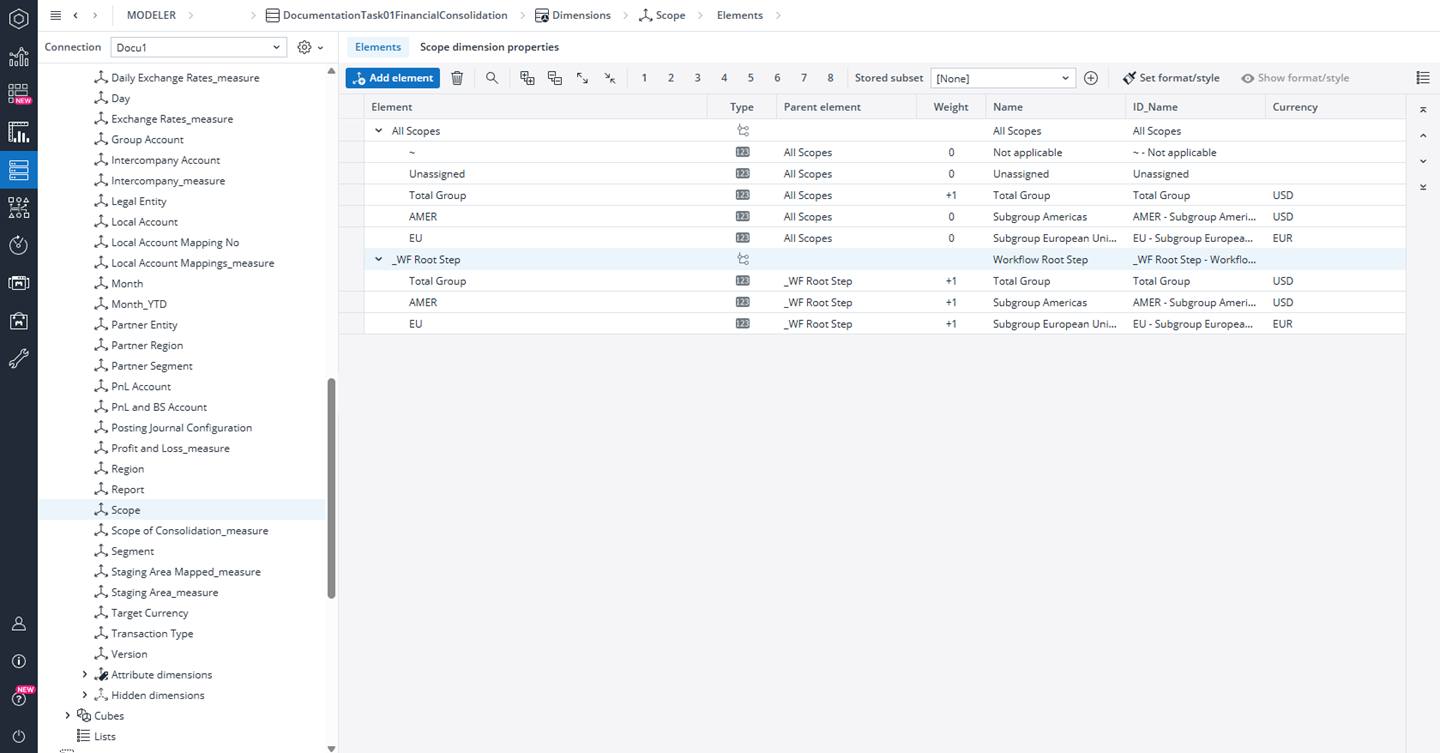
The Scope dimension includes all target elements for financial consolidation in a flat list, covering the Total Group and subgroup elements such as AMER and EU.
Hierarchy and Weight Rules
To maintain consistency across all consolidation-related dimensions, the Scope dimension must adhere to the following hierarchy and weighting rules:
-
Subgroup elements must have a weight of 0 and their structure should mirror the hierarchy used in the Legal Entity and Partner Entity dimensions.
-
Each subgroup element must be attached to the _WF Root Step parent with a weight of 1.
-
Always ensure full alignment between the Scope, Legal Entity, and Partner Entity dimensions to prevent inconsistencies in consolidation workflows and reports.
Note that you must not delete the following elements: All Scopes, ~, Unassigned, Total Group, and _WF Root Step. Removing any of these mandatory elements can disrupt consolidation processes and cause dependent reports or applications to malfunction.
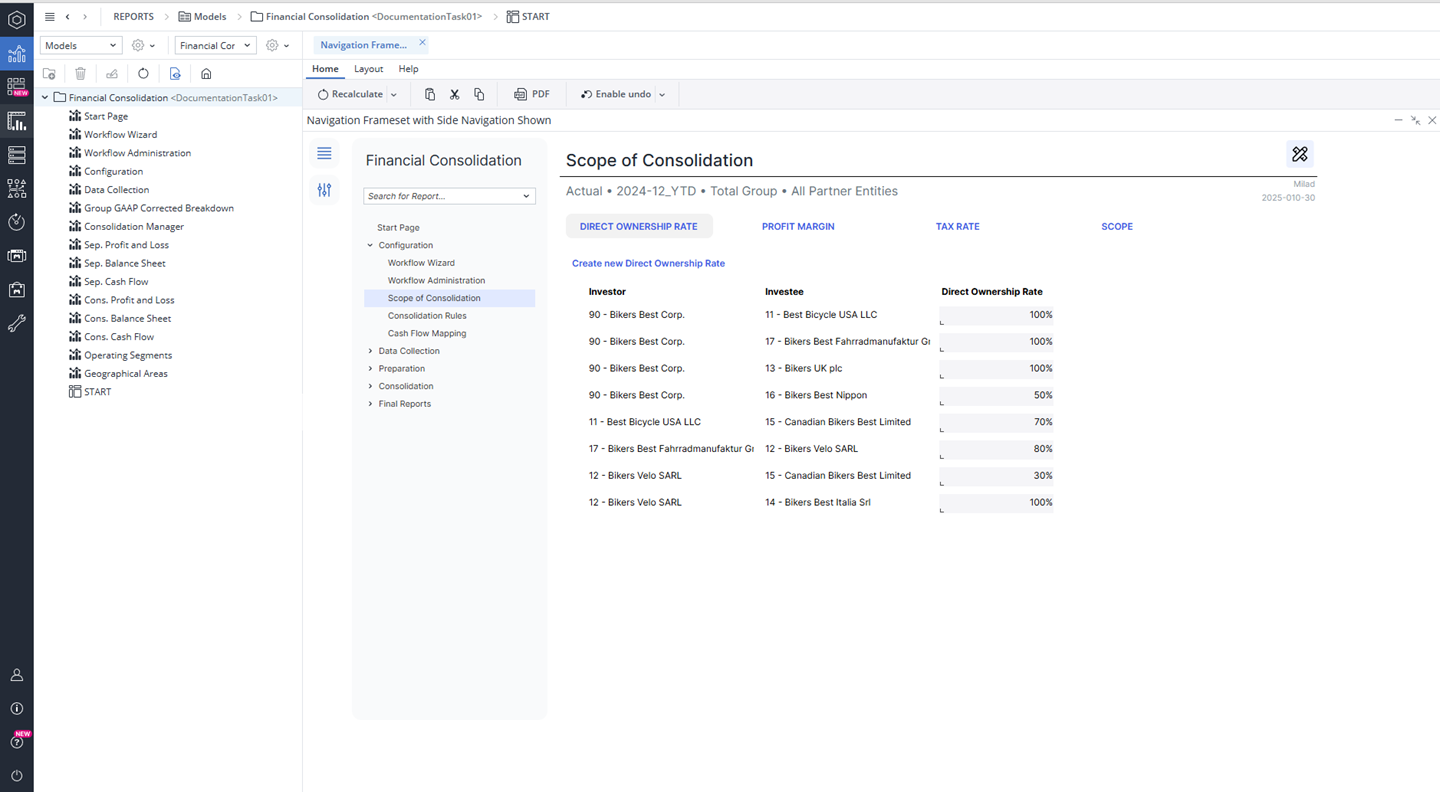
Once all three dimensions are filled out, you can proceed to the Financial Consolidation Scope of Consolidation . In this section, you can add a direct ownership rate or modify it, create new profit margin relations to capture tax rates for intercompany transactions, and specify the consolidation method within the scope screen.
Updated May 19, 2026