Return to the Financial Consolidation Model Overview
Every organization has its own Chart of Accounts (CoA) structure, which determines how financial data is categorized, aggregated, and reported during consolidation. As part of the pre-configuration process, it is essential to ensure that the Chart of Accounts used in the Financial Consolidation model is well-structured, consistent, and aligned across all legal entities and subsidiaries. A clean and unified CoA is critical for accurate and comparable group-level reporting.
Most organizations already maintain their Chart of Accounts within their ERP or accounting system. This existing structure can be brought directly into the Financial Consolidation model through a connector, or by using the Excel upload template provided in the sample data workbook. Users can update the Chart of Accounts information in the workbook and upload it to the appropriate dimension, or automatically transfer it from their source system.
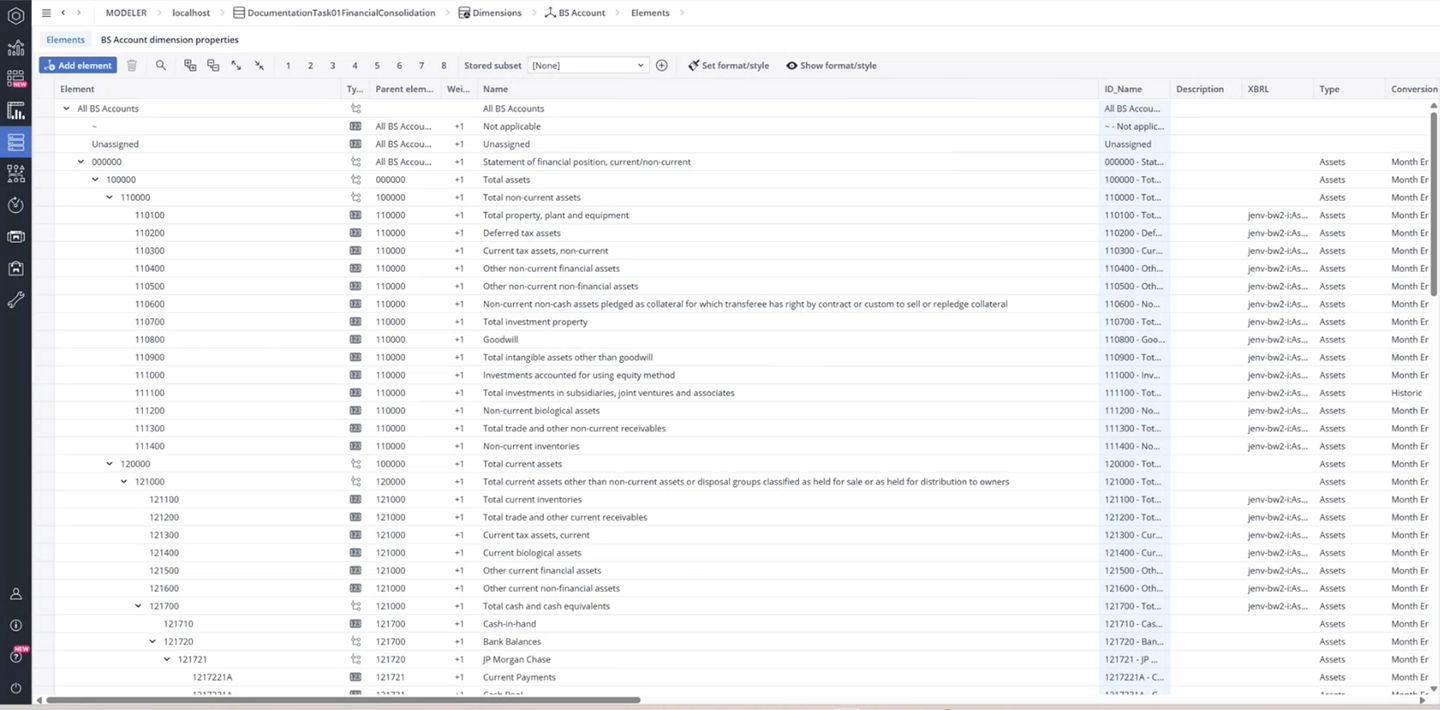
The Financial Consolidation model uses three dimensions for accounts—Balance Sheet (BS Account), Cash Flow (CF Account), and Profit & Loss (PnL Account). These dimensions store ledger accounts and reporting positions and can be customized to meet organizational requirements. To support flexible reporting structures, the model allows accounts to roll up into multiple reporting positions.
Working with the Chart of Accounts in the Model
The Financial Consolidation model provides flexible options for loading and maintaining your Chart of Accounts. Depending on your setup, you can upload accounts into any of the account-related dimensions which are involved in cash transactions, such as BS Account, CF Account, or PnL Account. These dimensions contain the hierarchies used for ledger accounts and reporting positions.
You can update account information directly in the account worksheets or by using the Upload Wizard to import changes. When uploading, ensure the option “Allow multiple parents within one hierarchy” is selected if accounts need to roll up into several reporting positions.
In the Modeler, the Chart of Accounts dimensions come predefined, but you can fully customize them to match your organization’s structure. Base elements represent individual ledger accounts or reporting positions, while aggregation elements define the reporting hierarchies used in financial consolidation.
BS Account Dimension
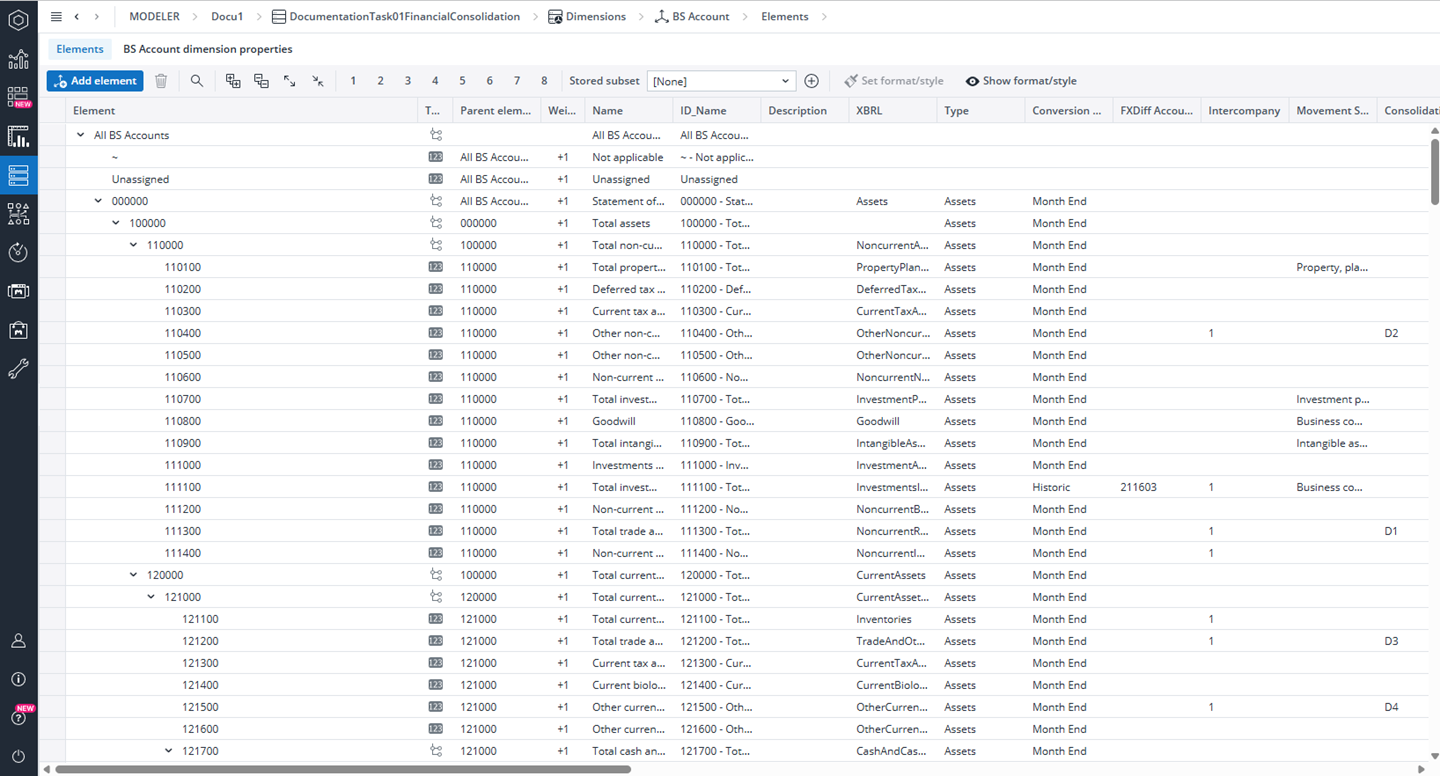
The BS Account dimension defines the balance sheet account structure used for reporting, planning, consolidation, and currency conversion. It supports multiple hierarchies such as Total Assets and Total Equity & Liabilities to allow flexible presentation and analysis of balance sheet data.
Key Setup Principles
Element Naming: Use the Account Number as the element name and the Readable Name as the Name attribute. This approach improves maintainability, supports translations, and aligns with common accounting standards.
Top-Level Hierarchies: The dimension typically includes the following top hierarchies: Total Assets, Total Equity & Liabilities, Optional parallel reporting hierarchies (if required for alternative views)
Calculation & Planning Attributes
The BS Account dimension includes several attributes used for planning logic, calculations, and future configuration options:
-
P / A Calculation: Defines planning or actuals formulas for individual accounts.
-
P / A Calculation Dependencies: Specifies the source cube for data transfer.
-
P / A Target Restriction: Defines the slice of business dimensions that receive transferred data.
-
DCS Attributes: Reserved for future configuration of debit/credit shifting (planned but not yet active).
Mandatory Elements and Constraints
Do not delete any of the mandatory elements All BS Accounts, ~, Unassigned, as removing these elements will cause reporting and consolidation logic to fail.
The following top-level accounts must alsoexist in the dimension: bs_account_assets (100000), bs_account_liabilities (200000), bs_accounts_equity (210000), bs_accounts_kpis (910000), andbusiness_combinations_transaction_type (BCmb.T999)
Note that all accounts must also comply with the model’s sign standards to ensure correct aggregation, consolidation, and reporting behavior.
BS Account dimension core attributes
The following are the core attributes of the BS Account dimension. For a detailed explanation of all balance sheet account attributes, you can also refer to the BS Account Dimension (Financial Consolidation).
| Attributes | Purpose |
| Name / ID_Name / Description | Display name, technical ID, and account description with optional localization. |
| Type | Assets or Liabilities (Liabilities = equity + liabilities). |
| Conversion Type | FX method (Month End, Historic, ~ for no conversion). |
| FXDiff Account | Account for foreign exchange differences. |
| Movement Schedule | Transaction type subset valid for the account. |
| Intercompany | 0 = no IC, 1 = IC relations. |
| Consolidation Rule | Elimination rule reference (e.g., Elim.Assets). |
| Clearing Account | Counter-account for eliminations. |
| Separate/Consolidated Statements | Controls reporting visibility and movement schedule reports. |
PnL Account Dimension
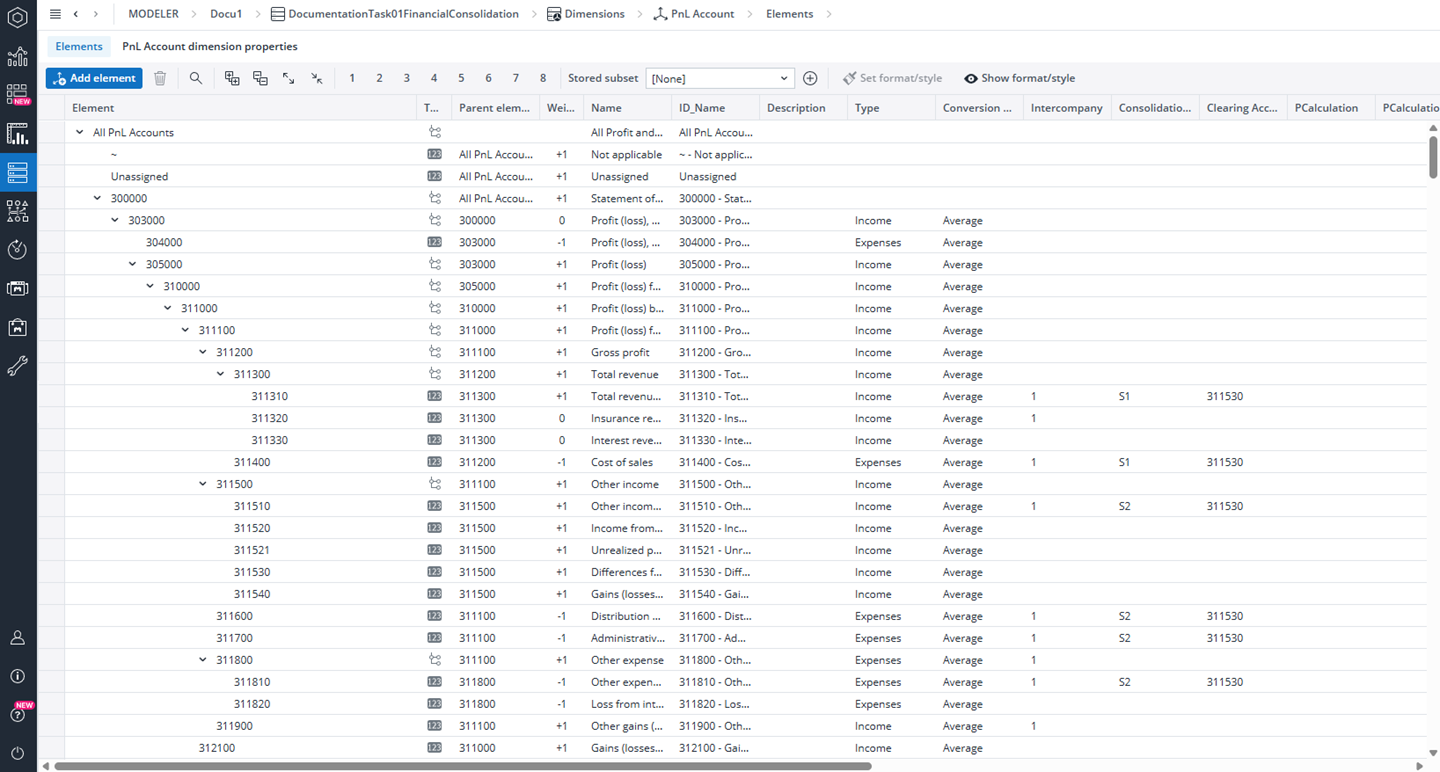
The PnL Account dimension defines the Profit & Loss and Total Comprehensive Income hierarchies used in consolidation, reporting, eliminations, planning, and currency conversion. It supports multiple reporting views including non-controlling interests (NCI), and multiple hierarchies (e.g., Profit/Loss result at the top). For more detailed guidance, refer to the PnL Account Dimension (Financial Consolidation) .
Key Setup Principles
Element Naming: Use the account number as the element name and the descriptive label as the Name attribute. This supports translations, ensures clarity in reporting, and simplifies maintenance.
Top-Level Hierarchies: The dimension typically includes the following primary hierarchies: Profit & Loss, Comprehensive Income, NCI breakdown, Optional parallel hierarchies for additional reporting perspectives
Formula=> Profit attributable to owners = Profit (loss) − Non-controlling interests
Calculation & Planning Attributes
The following attributes support planning workflows and automated calculations:
-
P / A Calculation: Defines planning or actuals formulas for specific PnL accounts.
-
P / A Calculation Dependencies: Specifies the source cube for data transfer.
-
P / A Target Restriction: Defines the slice of business dimensions that receive transferred data.
Mandatory Elements and Constraints
Do not delete any of the mandatory elements All PnL Accounts, ~, Unassigned, as removing these elements will cause reporting and consolidation logic to fail.
The following top-level accounts must exist in the PnL Account dimension: pnl_account_1 (305000) – Profit & Loss statement top, pnl_account_2 (330000) – Profit (loss), attributable to, pnl_account_3 (405000) – Total comprehensive income, pnl_account_4 (420000) – Comprehensive income attributable to, pnl_account_5 (510000) – KPIs parent.
All elements must comply with sign standards and the required regex settings used for DynaRange list generation.
PnL Account dimension core attributes
The following are the core attributes of the PnL Account dimension. For a detailed explanation of all balance sheet account attributes, you can also refer to the PnL Account Dimension (Financial Consolidation).
| Attributes | Purpose |
| Name / ID_Name / Description | Display name, technical ID, and account description with optional localization. |
| Type | Income or Expenses (empty for KPIs/statistical figures). |
| Conversion Type | FX method (e.g., Average, Month End, ~ for no conversion). |
| Intercompany | 0 = No IC, 1 = IC relations. |
| Consolidation Rule | Elimination rule reference (e.g., Elim.Income, Elim.Expenses). |
| Clearing Account | Counter-account for eliminations. |
| Aggregation Type | (empty) Additive, First, Last, Avg – controls semi-additive behavior. |
| Separate/ Consolidated/ Segment/ Region Statement | Reporting visibility across multiple statement types. |
CF Account Dimension
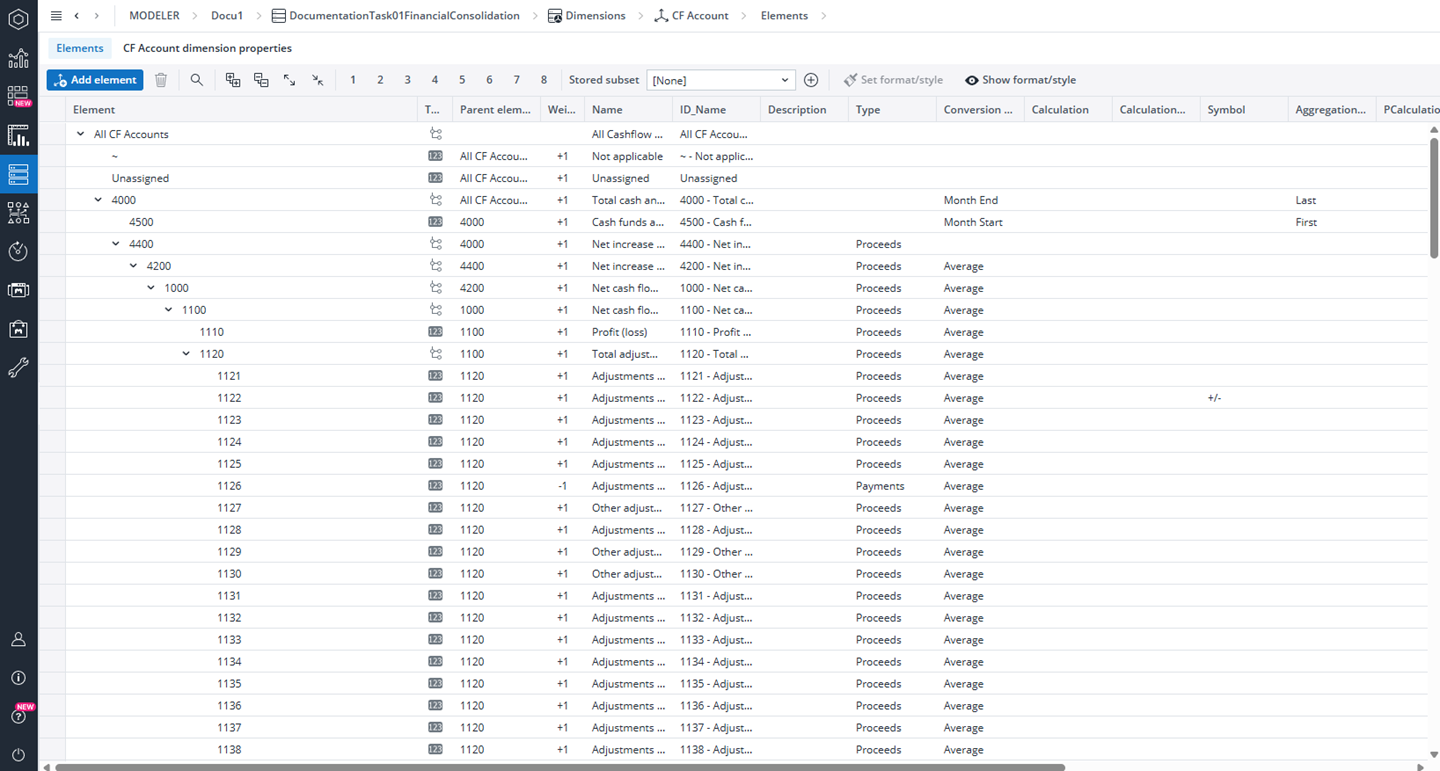
The CF Account dimension defines the structure used for Cash Flow reporting and planning. It covers all major cash flow categories—Operating, Investing, and Financing activities—along with opening and closing cash positions. This dimension ensures consistency, flexibility, and localization in Cash Flow statements across the consolidation model. For more details, refer to the CF Account Dimension (Financial Consolidation) article.
Key Setup Principles
-
Element Naming: Use the Account Number as the element name and the Readable Name as the Name attribute. This approach improves maintainability, supports translations, and aligns with common accounting standards.
-
Hierarchies: Build reporting hierarchies that reflect your organization’s cash flow structure, supporting consolidation and analysis across multiple levels.
-
Localization: Leverage the Name attribute for multi-language translations, ensuring the Cash Flow hierarchy appears correctly for all users.
-
Attributes for Behavior Control: Use dimension attributes to govern currency conversion, aggregation, and reporting logic.
Calculation & Planning Attributes
The following attributes drive cash flow planning and data transformation:
-
Type: Defines whether an element represents Proceeds or Payments. Leave empty for KPIs or statistical items.
-
Conversion Type: Specifies the currency conversion method for Average, Month End, Historic, or ~ (no conversion).
-
Calculation / Dependencies: Defines the calculation rule and identifies the source cube for planning data transfers.
-
Aggregation Type: Controls how values accumulate- Additive, First, Last, or Average.
-
Symbol (optional): Specifies how values are displayed in reports (e.g., +, -, =, +/−).
Mandatory Elements and Constraints
Do not delete the required elements All CF Accounts, ~, Unassigned, as these elements are essential for Cash Flow reporting and system calculations.
Additionally, make sure that cf_account (400) is included in the account settings and remains intact.
CF Account dimension core attributes
The following are the core attributes of the CF Account dimension. For a detailed explanation of all balance sheet account attributes, you can also refer to the CF Account Dimension (Financial Consolidation) .
| Attributes | Purpose |
| Name / ID_Name | Readable & technical name (supports localization) |
| Description | Instructions or account definition |
| Type | Flow classification (Valid values are proceeds and payments) |
| Conversion Type | Currency conversion rule |
| Format | Number formatting |
| Calculation / Dependencies | Rule logic & data source |
| Symbol | Optional display indicator |
| Aggregation Type | Controls rollup behavior |
| Segment / Region Statement | Reporting exposure (by segment or geography) |
Updated October 5, 2026