Return to the Financial Consolidation Model Overview
Currency conversion in the Financial Consolidation model ensures that all financial results recorded in the local currencies of individual entities are translated into the group currency and any additional reporting currencies required for consolidation. The conversion process in Jedox is not driven by a single setting; instead, it results from the combined interaction of several components. These include the cube in which data is stored, the consolidation level, and the conversion type assigned to each account in both the BS Account and PnL Account dimensions, as well as the conversion type configured in the Transaction Type dimension. Only when these elements work together can the model correctly determine how each value should be translated. In practice, currency conversion in Jedox is the outcome of logic defined at the cube level, the consolidation stage being executed, the classification of the account, and the conversion methodology selected for the specific transaction.
Exchange rates and data retrieval
Exchange rates are maintained through the Exchange Rates screen, which provides the user with two methods for bringing exchange-rate data into the model.
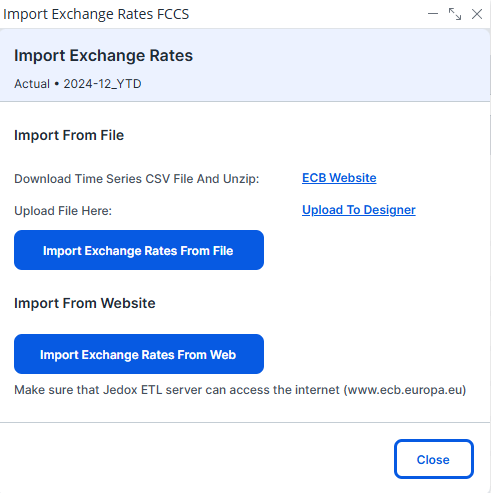
First, exchange rates can be downloaded directly from the European Central Bank (ECB) by using the "Import Exchange Rates from Web" button in the interface.
When this button is pressed, Jedox triggers an automated job that fetches the latest rates and writes them into the system. Once the job completes, a status banner is displayed at the top of the screen:
-
Green: Successful execution
-
Yellow: Finished with warnings
-
Red: Job failed
This feedback helps administrators verify whether exchange rates have been correctly imported and are available for the consolidation process.
Alternatively, users who maintain their own rate files can upload exchange rates manually through Designer. Click on the "Upload to Designer" button, and upload an unzipped CSV file to the designer. Then click on the "Import Exchange Rates from File" button.
In both cases, the final values are stored in the same location, i.e., the Exchange Rates cube.
This cube holds all exchange-rate information used in the consolidation process and is composed of the dimensions Version, Month, Conversion Type, Currency, Target Currency, and Exchange Rates_measure. The rates stored here include month end, month start, average, and historic exchange rates. These values can either be downloaded directly from the ECB website or imported by the user, but regardless of their source, the model relies on these rates when converting local values into group currency across all stages of consolidation.
Conversion Types in the Account Dimensions
Correct currency translation depends heavily on the configuration of the BS Account and PnL Account dimensions. When setting up the Balance Sheet accounts, each account must be assigned an appropriate Conversion Type, as this attribute determines which rate (month start, average, month end, or historic) will be used.
Most asset accounts follow the month end rate for closing balances. However, certain accounts require different handling. For example, Investments in subsidiaries, Joint ventures, and Associates typically carry a historic conversion type. Even so, the closing balance for these accounts still needs to be translated at the month end rate, and any resulting FX difference from this translation is posted automatically to a designated FX difference account, such as 211603. Although this is the only asset account that commonly uses historic conversion by default, users may assign historic conversion to additional accounts if their reporting standards require it.
Outside of asset accounts, several equity and reserve accounts also use historic conversion. These include accounts representing opening balances, increases, and decreases throughout the year. Every account that uses historic conversion must also have its FX Diff Account attribute set to ensure that all foreign exchange differences are captured and posted correctly.
Within equity, most accounts follow the historic rate for openings, movements, and closings. However, Retained Earnings behaves differently because values flowing into retained earnings originate from the PnL statement. Since PnL values are translated at average rate, those values pass into retained earnings at the same average rate. Other equity accounts, such as share premium, follow a consistent historic conversion pattern regardless of increases or decreases. Meanwhile, the reserve for exchange difference on translation uses the previous year’s carried-forward values for openings, and any differences arising from translation are recorded through a dedicated FX diff transaction type.
Liability accounts, in contrast, generally translate at month end rate, ensuring consistency between closing balances and translated figures.
Conversion logic in Balance Sheet and PnL statements
The translation methodology begins with opening balances, which are converted using the month start rate. Throughout the year, movements in most Balance Sheet accounts use the average rate. Finally, closing balances are converted using the month end rate. The difference between the sum of translated opening balances plus translated movements and the translated closing balance at the month end rate represents the foreign exchange difference. This difference is automatically posted to the appropriate FX difference account.
In the Profit and Loss statement, all activity represents movements occurring during the year. Therefore, every PnL account is translated exclusively at the average rate. The same principle applies to the Total Comprehensive Income statement, where all movements are also translated at the average rate.
Conversion timing across consolidation levels
Currency conversion occurs at specific points in the consolidation workflow. From Local GAAP up to the Combined Financial Statement (Calculated) level, values are stored in local currency and translated into group currency or any additional reporting currency required. Once the consolidation reaches the Combined Financial Statement level, all subsequent postings (adjustments, eliminations, and corrections) should be performed directly in group currency. This approach ensures that the consolidated results remain accurate, easy to audit, and consistent across all reporting stages.
Throughout these stages, Jedox automatically determines the correct exchange rate to apply based on the configured attributes. The model uses month start, average, historic, and month end rates from the Exchange Rates cube to perform translation, and the system also calculates all necessary FX differences, posting them into the appropriate equity accounts designated to hold translation differences. This ensures that the Balance Sheet reconciles as required and that translated values reflect the correct closing positions once consolidation is complete.
Running Currency Conversion
Once exchange rates, conversion types, and FX diff accounts are fully configured, the conversion runs as part of the Consolidation process. During this process, all opening balances, movements, and closing values are translated according to the defined rules. Jedox ensures that FX differences reconcile within equity so that the final consolidated Balance Sheet remains balanced. After running consolidation, users can review translated values in the Consolidated Balance Sheet and verify that FX differences have been correctly allocated.
Updated May 19, 2026