Return to Financial Consolidation Model Overview.
Merging Data from the Investment Register into the Balance Sheet Cubes
The primary data stream processed in the consolidation procedure originates from the separate financial statements collected in the source element Local GAAP category of the Consolidation dimension.
As the consolidation progresses, various processing stages align with different base elements within this dimension. For instance, base elements such as Adjustment 1, Transition, and Correction are journaled, implying that their data is entirely defined through journal entries in the posting journal. Conversely, elements like the Adjustment Consolidation Method are not journaled, meaning their data is directly inputted into the cubes without any entries in the posting journal.
The data merged from the investment register into the Balance Sheet and Balance Sheet (Segment) cubes are written to the base elements in the new Adjustment Investment Register hierarchy, which are not journaled.
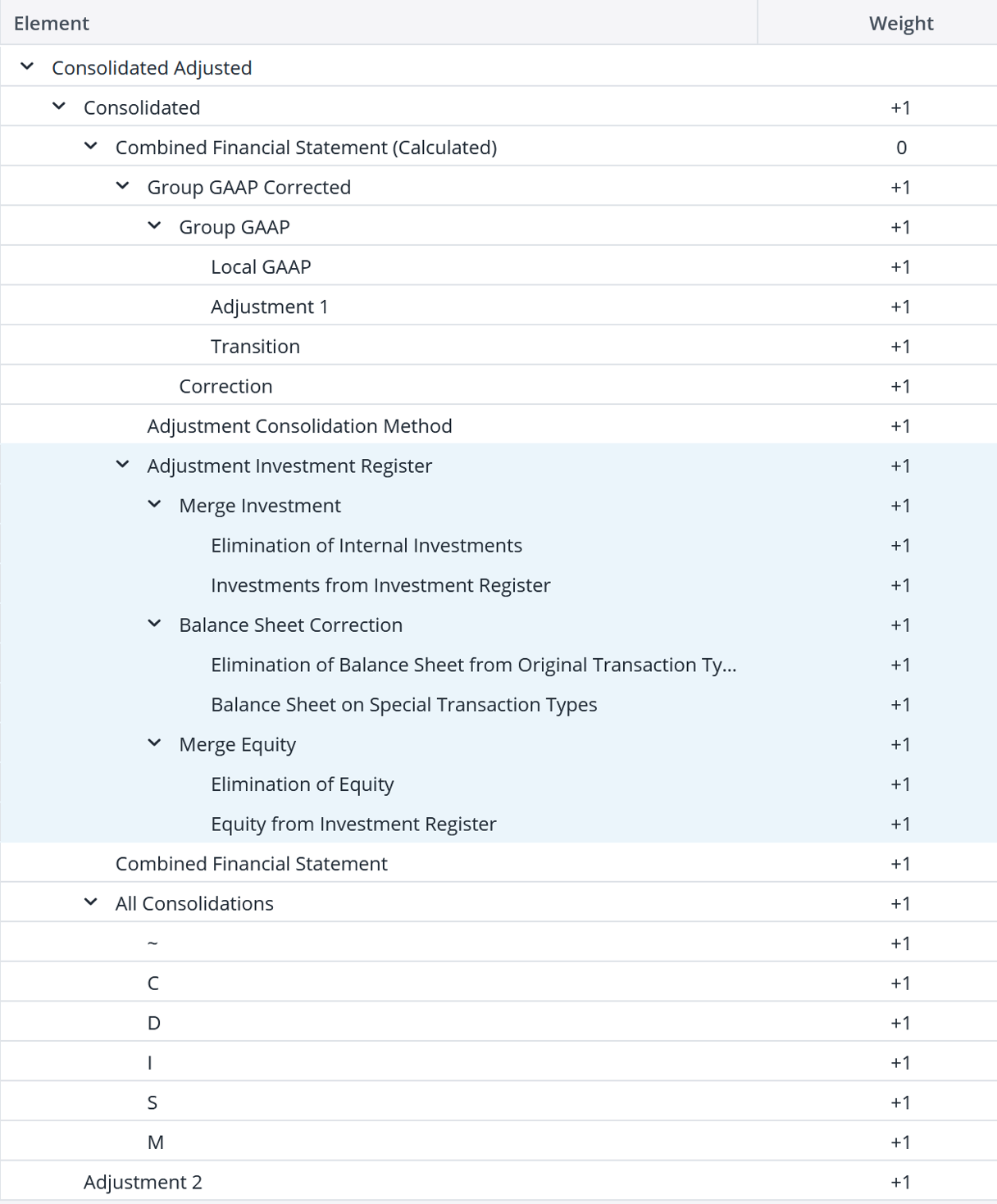
Incorporating data from the investment register into the Balance Sheet and Balance Sheet (Segment) cubes constitutes an integral step within the consolidation process. This operation is executed across one or more combinations of Version, Month_YTD, and Scope. It can be run for either the consolidation ledger, thereby adjusting the Balance Sheet cube, or for the segment consolidation ledger, adjusting the Balance Sheet (Segment) cube. Alternatively, it can be applied to both ledgers simultaneously, thereby modifying both balance sheet cubes concurrently.
This subprocess consists of the following steps:
-
Clear data on the Adjustment Investment Register
-
Merge Investments
-
Moving the balance sheet from the investee to special transaction types
-
Merge Equity
The following sections describes these steps in detail.
1: Clear Data on Adjustment Investment Register
As a preliminary step, all data on the base elements of the Adjustment Investment Register hierarchy within the Consolidation dimension is removed from both the Balance Sheet and Balance Sheet (Segment) cubes for the current Version, Month_YTD, and Scope under processing. It's important to note that the Adjustment Investment Register element is not hardcoded; rather, this action effectively clears all consolidation levels as configured in:
Merge Investment.Elimination.Consolidation,
Merge Investment.Addition.Consolidation, Balance Sheet
Correction.Elimination.Consolidation, Balance Sheet
Correction.Addition.Consolidation, Merge Equity.Elimination.Consolidation, and Merge Equity.Addition.Consolidation attributes of the Business Transaction Type dimension.

2. Merge Investments
The investment register records changes in the investor's investment account. This data can be merged into the Balance Sheet and Balance Sheet (Segment) cubes. Currently, the only available method is replacing the investments reported in the separate financial statements with the investments from the investment register.
A. Replace Opening and Movements on Internal Investments
The values in the selected investment account (on the Group GAAP Corrected level after the changes on the Adjustment Consolidation Method level) are replaced with the values from the investment register corresponding to the same Version, Legal Entity, and Scope.
This replacement process exclusively applies to investments into entities within the current scope. This is defined by the Partner Entity of the investment as a descendant of the current Scope within the Partner Entity dimension.
Note that this modifies the investment value if the investment register is inconsistent with the separate financial statement. This is intentional.

B. Eliminate Internal Investments from the Separate Financial Statements
The base elements of the T999 Closing element within the Transaction Type dimension of the investment account, at the Group GAAP Corrected or Adjustment Consolidation Method level, are removed for the configured transaction type (e.g., T011 - Incoming Units) and consolidation level (Merge Investment.Elimination.Consolidation).
C. Add Past Investments from the Investment Register
The T000 - Opening is replaced by the total of all business transactions in the past (which are transactions applying to a Month_YTD that was before the current reporting period. (As an example, for the current reporting period 2020-06_YTD, any transaction applicable to 2019-12_YTD or earlier is in the past.)
Replacing the opening balance with values from the investment register will not only replace the values submitted in the local currency LC but also enrich the data by the amount converted at historic rates (e.g., on the USD_Historic currency). This is important because such data is available in the investment register but eventually missing in the reported separate financial statements.
D. Add Current Investments from the Investment Register
All movements in the current reporting period (T850 - Movements, T800 – FXDiff, and their descendants) are replaced by investments from investment register entries. (As an example, for the current reporting period 2020-06_YTD, any transaction applicable between 2020-01_YTD and 2020-06_YTD is in the current period.)
3. Move the balance sheet from the investee to special transaction types
The investee reports its financial statements (including an opening balance, movements, and a closing balance) from the perspective of a single company.1
Please note that this method is triggered by the business transaction on an investee and then operates entirely on amounts in the balance sheet cubes. It does not process any amounts from the investment register.
A. Move Opening
When an entity is consolidated within a scope, its opening balance should not be incorporated into the opening balance of the scope. This rule is applicable to any business transaction having one of the following types:
-
1 - Investment
-
11 - Merger Inflow
-
12 - Acquisition in the subgroup from other group entity
Typically, this step applies to any element within the Business Transaction Type dimension that has the Move Opening in the Balance Sheet Correction.Method attribute:

The values are eliminated from the T000 - Opening transaction type and moved to the T011 - Incomming units transaction type (or whatever transaction type configured in the Balance Sheet Correction.Transaction Type attribute).
B. Remove Opening and Movements (deprecated)
When an entity is removed from a scope, its closing balance, which comprises both its opening balance and movements, should be excluded from the closing balance of the scope. This rule applies to any business transaction having one of the following business transaction types:
-
2 - Divestment
-
21 - Merger Outflow
-
22 - Divestment from subgroup to other group entity
Typically, this step applies to any element in the Business Transaction Type dimension that has the Remove Opening and Movements in the Balance Sheet Correction.Method attribute:

The sum of the T000 (Opening), T850 (Movements), and T800 (FXDiff) is offset against the T991 (Outgoing units) transaction type or any other transaction type configured in the Balance Sheet Correction.Transaction Type attribute.
4. Merge Equity
The Merge Equity feature enhances equity data management by eliminating redundant data entry and improving accuracy. Currently, historic rates (amounts converted into group currency at the historic exchange rate) for equity accounts are repeatedly entered in various financial statements and the Investment Register, which is time-consuming. By pulling these rates directly from the centrally stored Investment Register, Merge Equity streamlines the process, accelerates data collection, and improves data quality.
Merge Equity automates the integration of historic rates for equity accounts from a central repository, eliminating manual data entry across financial statements. Furthermore, by utilizing centrally stored data in the Investment Register, Merge Equity minimizes errors associated with manual input, thereby improving data integrity.
Activating Merge Equity in settings
To enable Merge Equity, go to Settings and check the corresponding box.
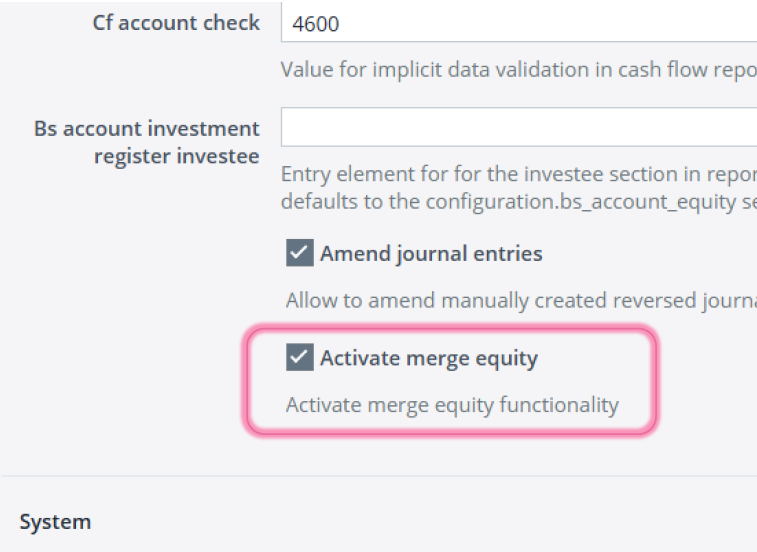
If checked, the feature is active; if unchecked, the consolidation process follows the previous version.
Scenario: execute consolidation procedure
Execute the consolidation process in the Consolidation Manager for the specified time periods. Example: 2020-12_YTD.

Historic exchange rates for equity accounts (excluding retained earnings accounts) from all business transactions before 2020-01_YTD will be recorded in the separate financial statements for 2020-12_YTD under Transaction Type T000 (Openings).
Historic exchange rates for equity accounts (excluding retained earnings accounts) from all business transactions during the period of 2020-12_YTD will be recorded in the separate financial statements for 2020-12_YTD under Transaction Type T299 (Movements).
Transactions that occur after 2020-12_YTD will not be included for the selected period of 2020-12_YTD, as they represent future activity.
Visible changes in Report Designer (Paste Views)
When the Merge Equity option is activated in Settings and consolidation is performed with the required parameters, the report builder will be able to see the changes.
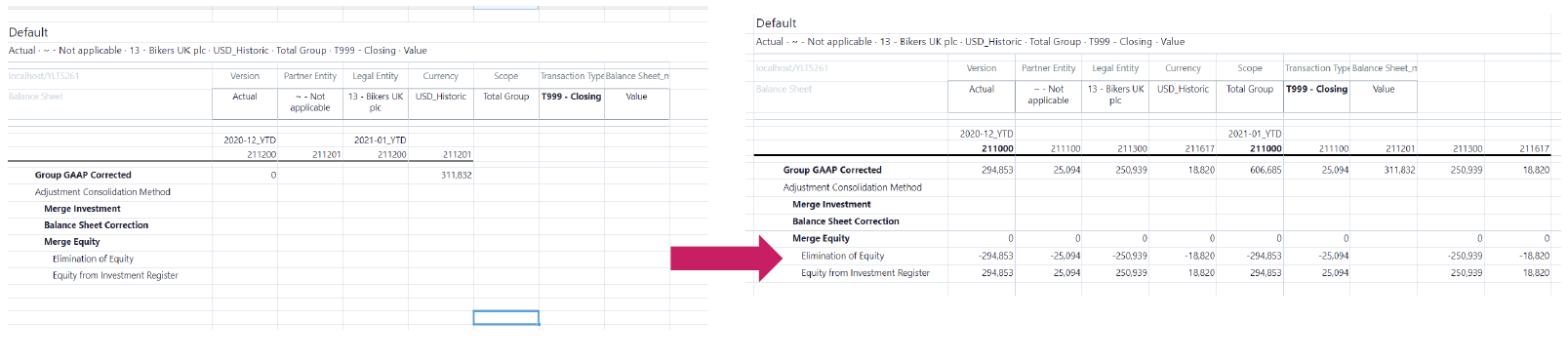
If there are already historic rates in the separate financial statements, they will be offset on the element labeled “Elimination of Equity.”
When addition or replacement of historical rates in the separate financial statements with values from the Investment Register is executed, historic rates from the Investment Register are incorporated into the separate financial statements under the element “Equity from Investment Register.”
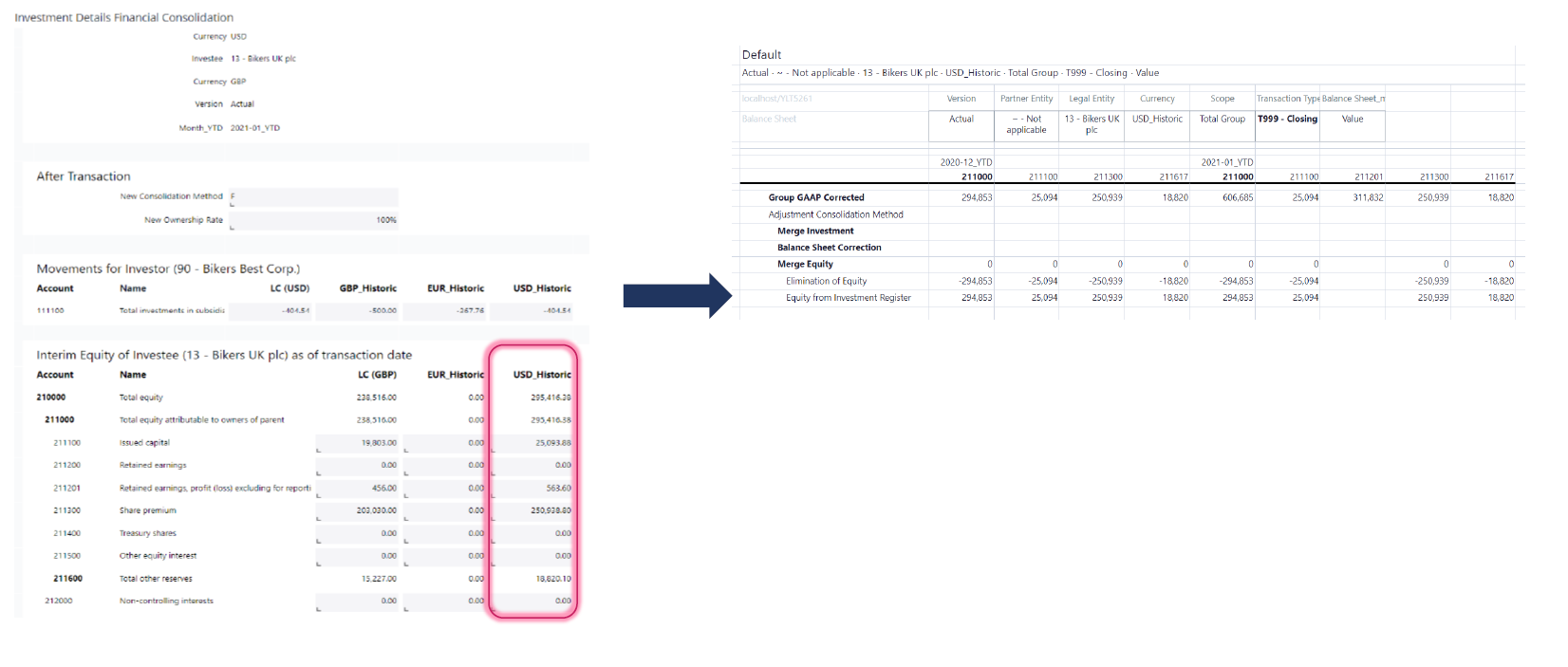
Incorporation of scenario: Equity Movement - other changes (Business Transaction Type 39)
The investment register functionality has been designed to capture changes in an investee's equity value that do not result from capital increases, capital decreases, or ownership changes. Instead, it reflects pure remeasurement or revaluation effects on the investee’s equity.
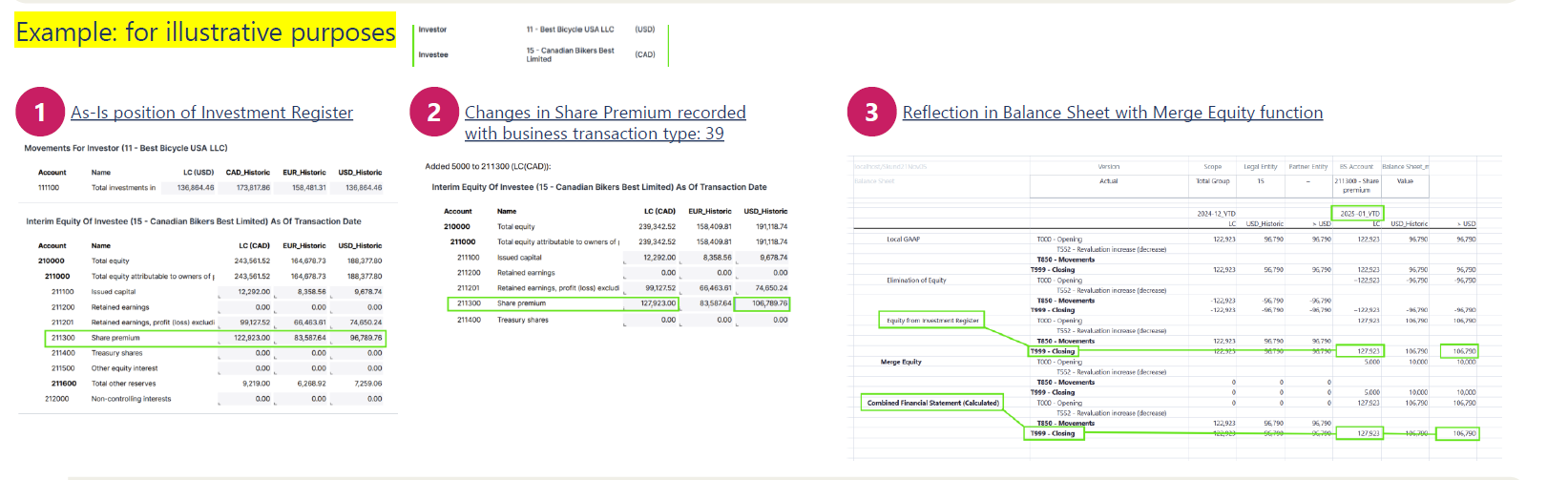
This transaction type ensures that equity movements related to other changes are explicitly tracked, improving transparency and alignment between Investment Register movements and Consolidation results (including equity elimination, merger equity steps, and combined financial statements).
Capital Increase (Decrease)
Capital Increase (Decrease) refers to a scenario where an investor increases or decreases their capital contribution to a subsidiary, without affecting the ownership percentage within the consolidation scope (group). This proportional change adjusts the investor’s recorded investment and the subsidiary’s equity balances accordingly —meaning all shareholders participate equally, and ownership percentages remain unchanged. This is commonly used in planned equity funding or capital restructuring, where the structure of ownership isn’t affected but the absolute investment values are.
A centralized and transparent process for managing Capital Increase (Decrease) events through the Investment Register, allowing users to:
-
Record capital changes consistently across entities.
-
Leverage a configurable, pre-built consolidation rule that automates journal entries.
-
Support complex transactions such as
Total Divestment, without manual adjustments.
High-Level Process Flow
-
Investor: Initiates a change in their investment amount.
-
Subsidiary: Reflects a change in the equity account balances based on ownership.
-
Subsidiary: Non-Controlling Interests (NCI) are recalculated from the closing balance.
-
Subsidiary: The portion of equity attributable to the Parent Company is updated.
-
Investor: The impact of the capital adjustment is computed from a group consolidation perspective.
Notes:
-
Values in the separate balance sheet and the investment register must be aligned to ensure consistency and avoid discrepancies.
-
Values in the Separate Financial Statements are recorded based on Local GAAP, on the Transaction type T121 of the local currency, and within the ~ scope.
-
The investment account values for subsidiaries must be consistent between the Local GAAP Separate Financial Statements and the Investment Register
Example
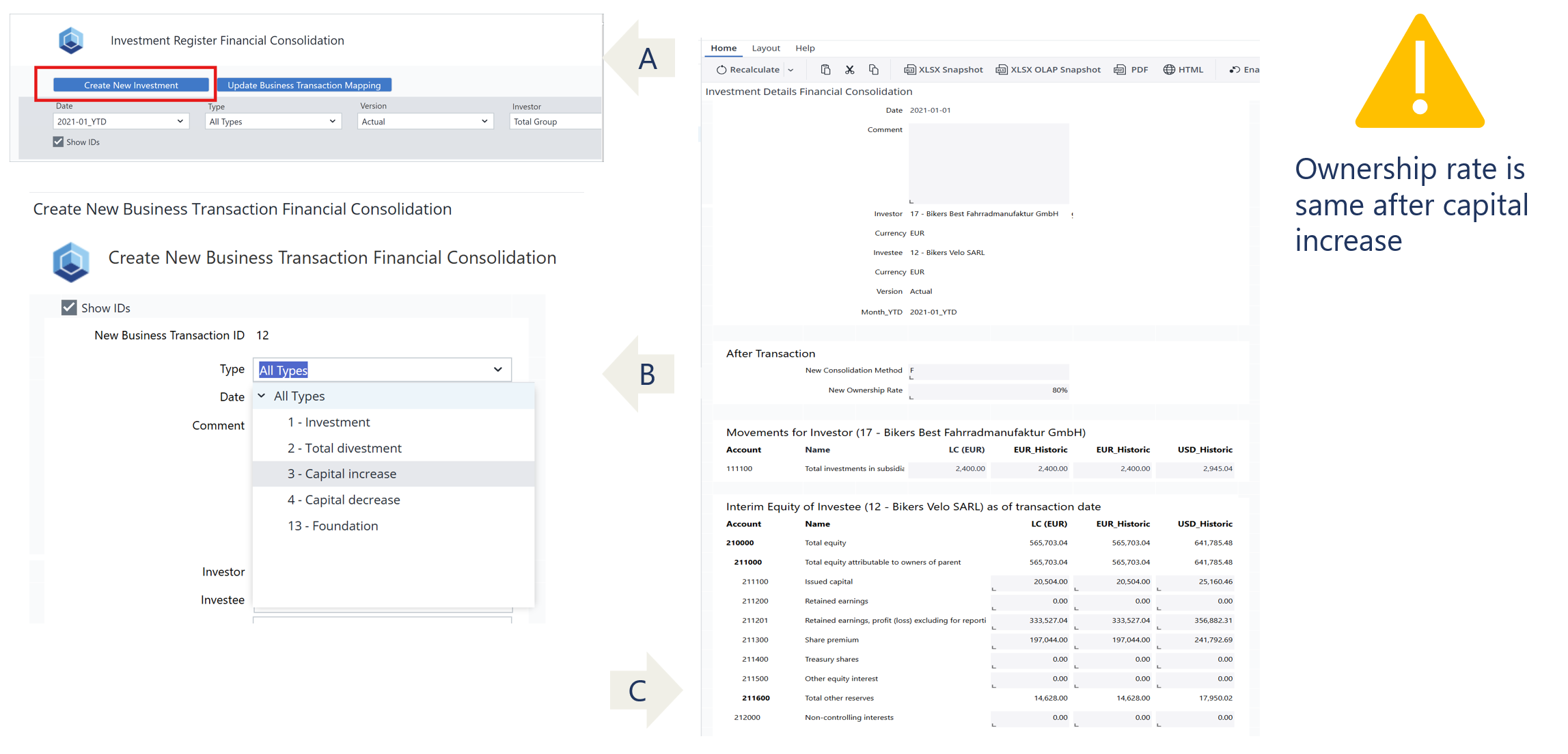
The following example illustrates a step-by-step guide to the Capital Increase transaction initiated by Legal Entity 17 – Bikers Best Fahrradmanufaktur GmbH in Legal Entity 12 – Bikers Velo SARL on January 31, 2021.
-
Recording Capital Increase or Decrease events directly in the Investment Register
-
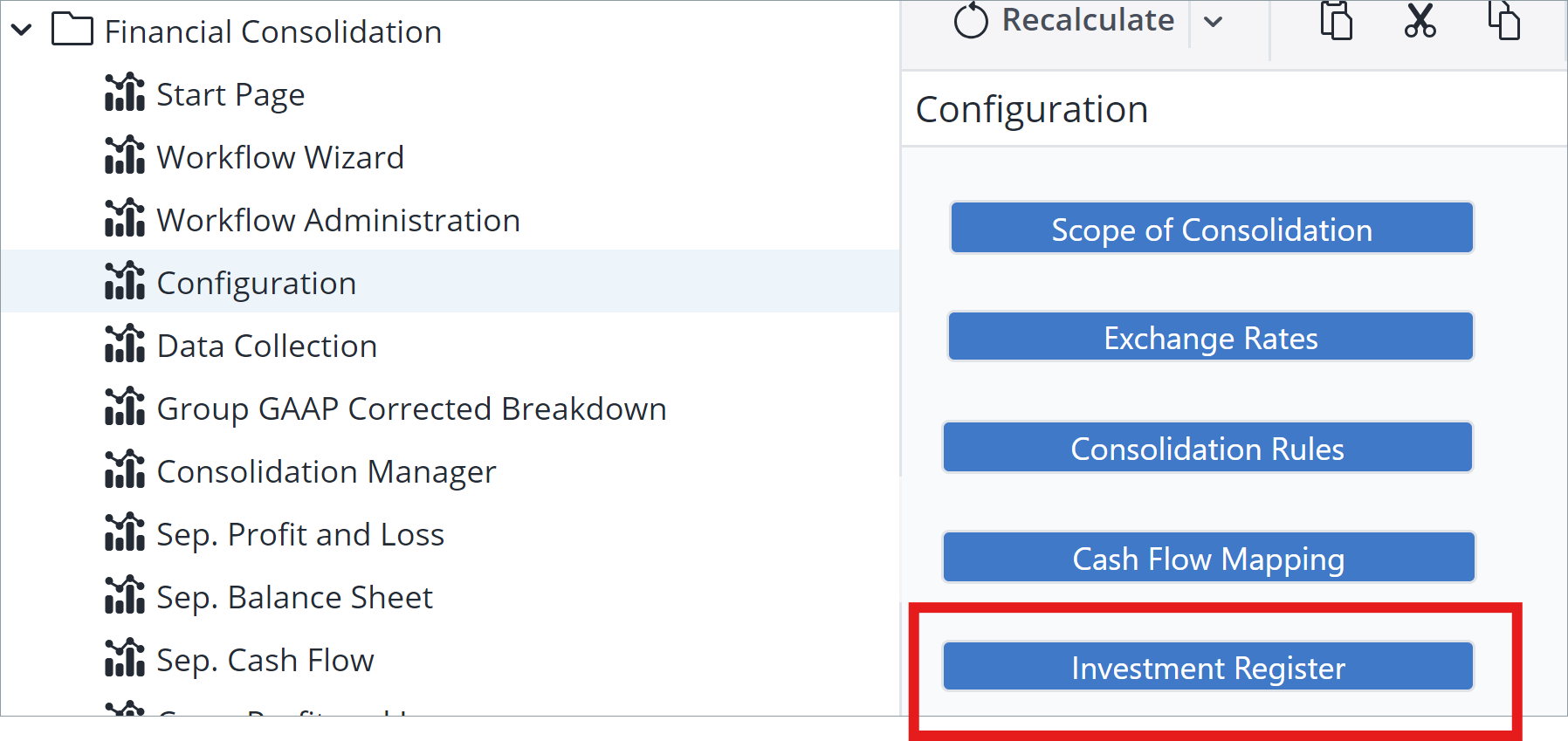
Open Investment Register
-
Create New Investment (Business Event)
-
-
Defining Consolidation Scope Parameters:
i) Ownership Percentage (%): Specify the investor’s share in the subsidiary.
ii) Consolidation Method: Select the applicable method, e.g., F – Full Consolidation.-
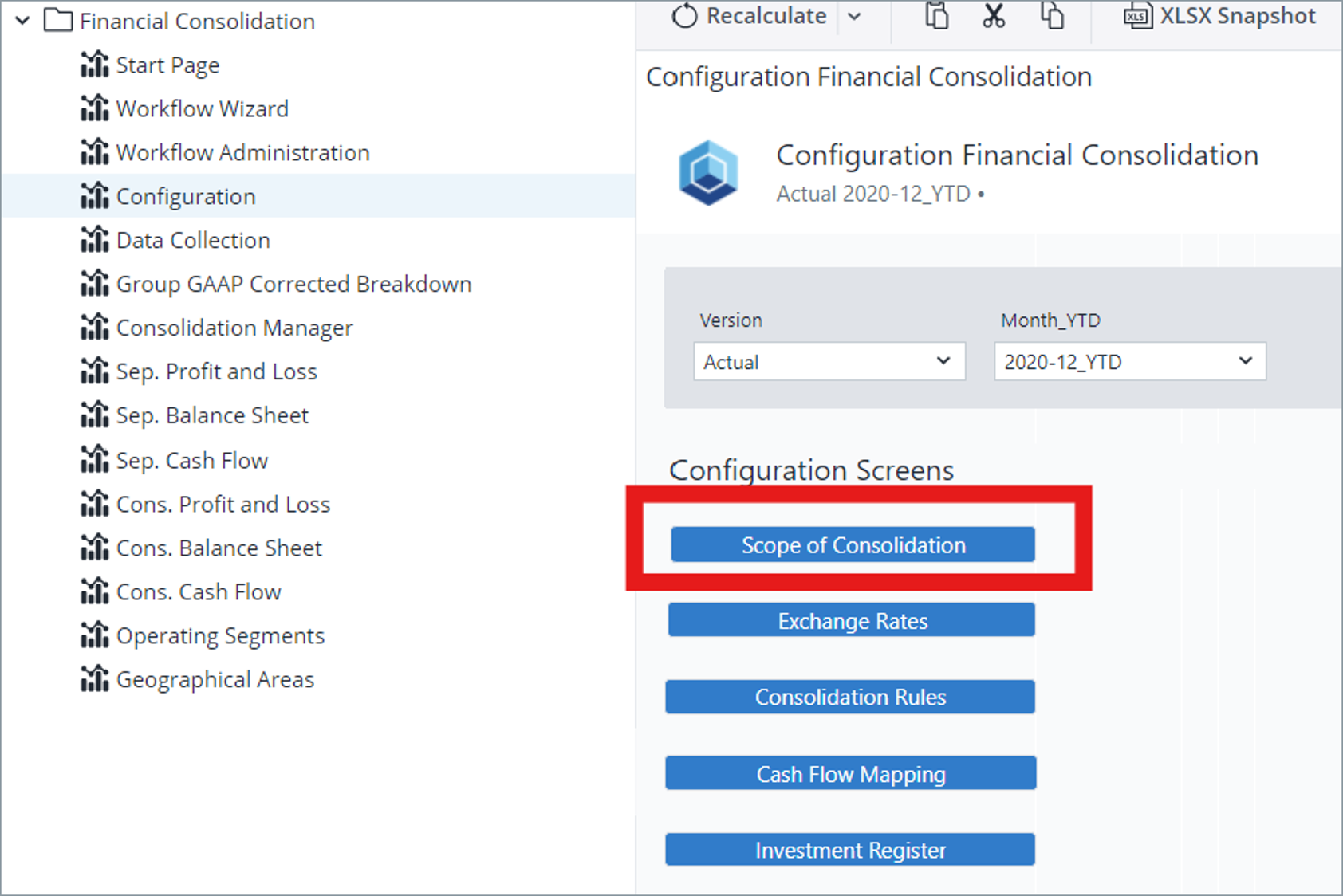
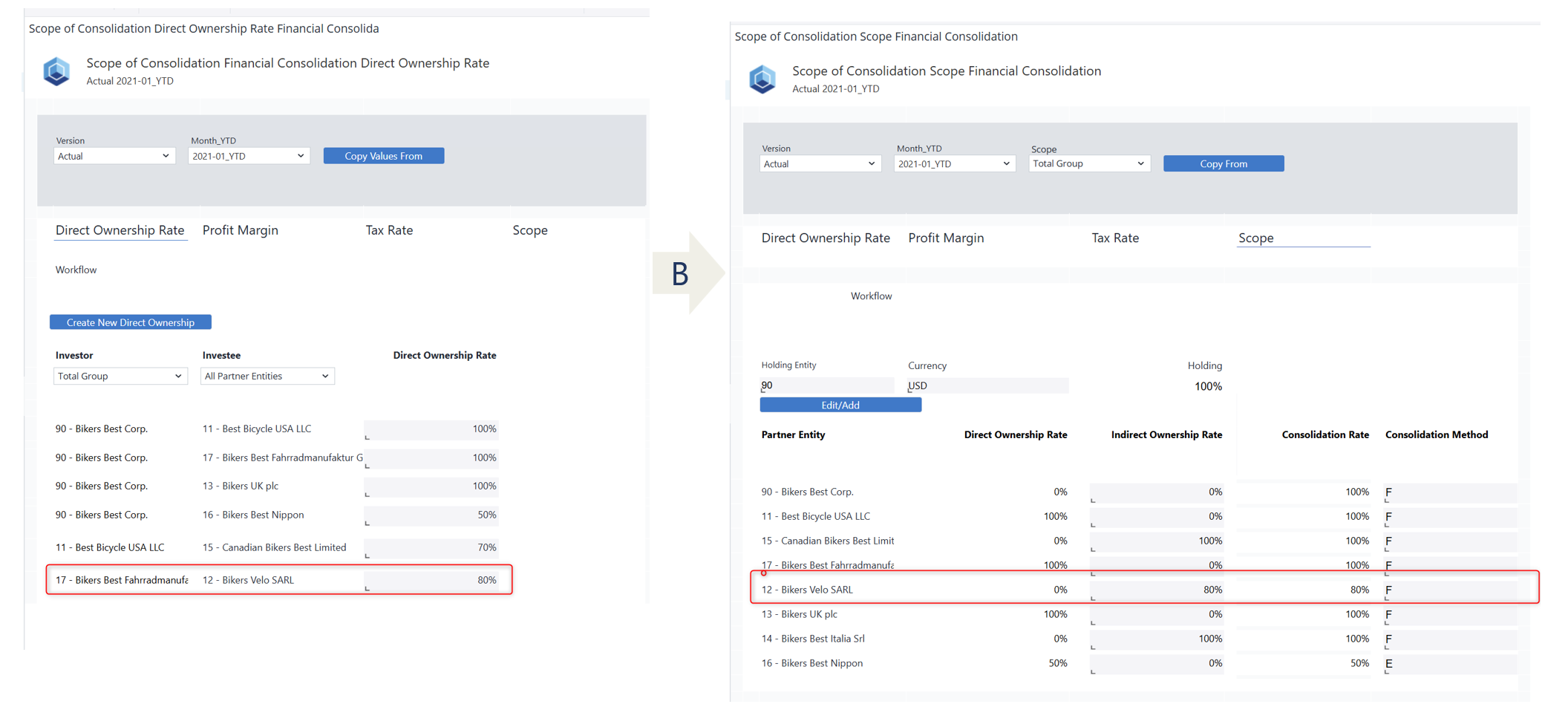
Open Scope of Consolidation Parameters
-
Ownership percentage and consolidation method are the same as they were before the Capital Increase (Decrease).
-
-
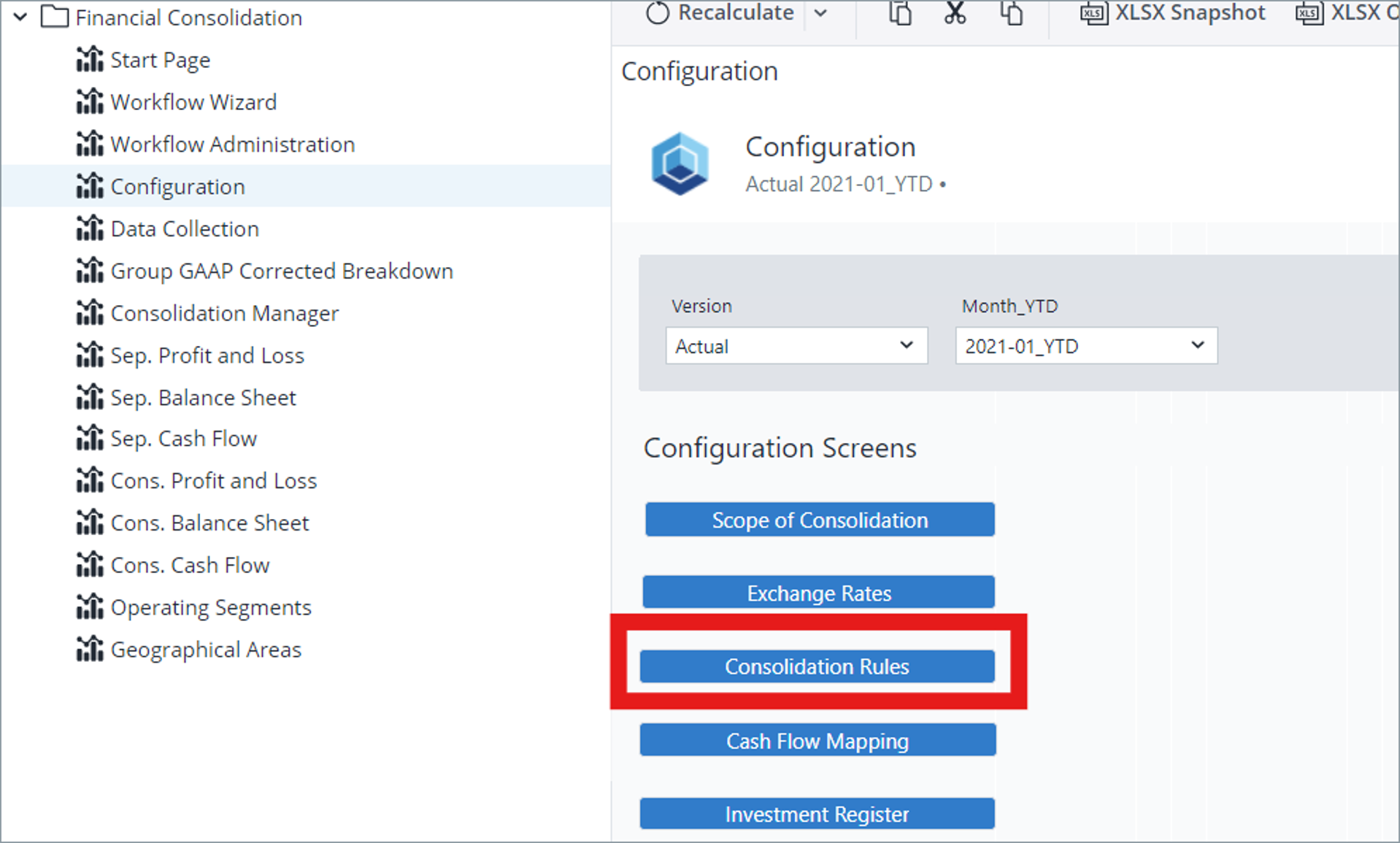
Step 3: Consolidation Rules Configuration
-
Open Consolidation Rule Configuration
-
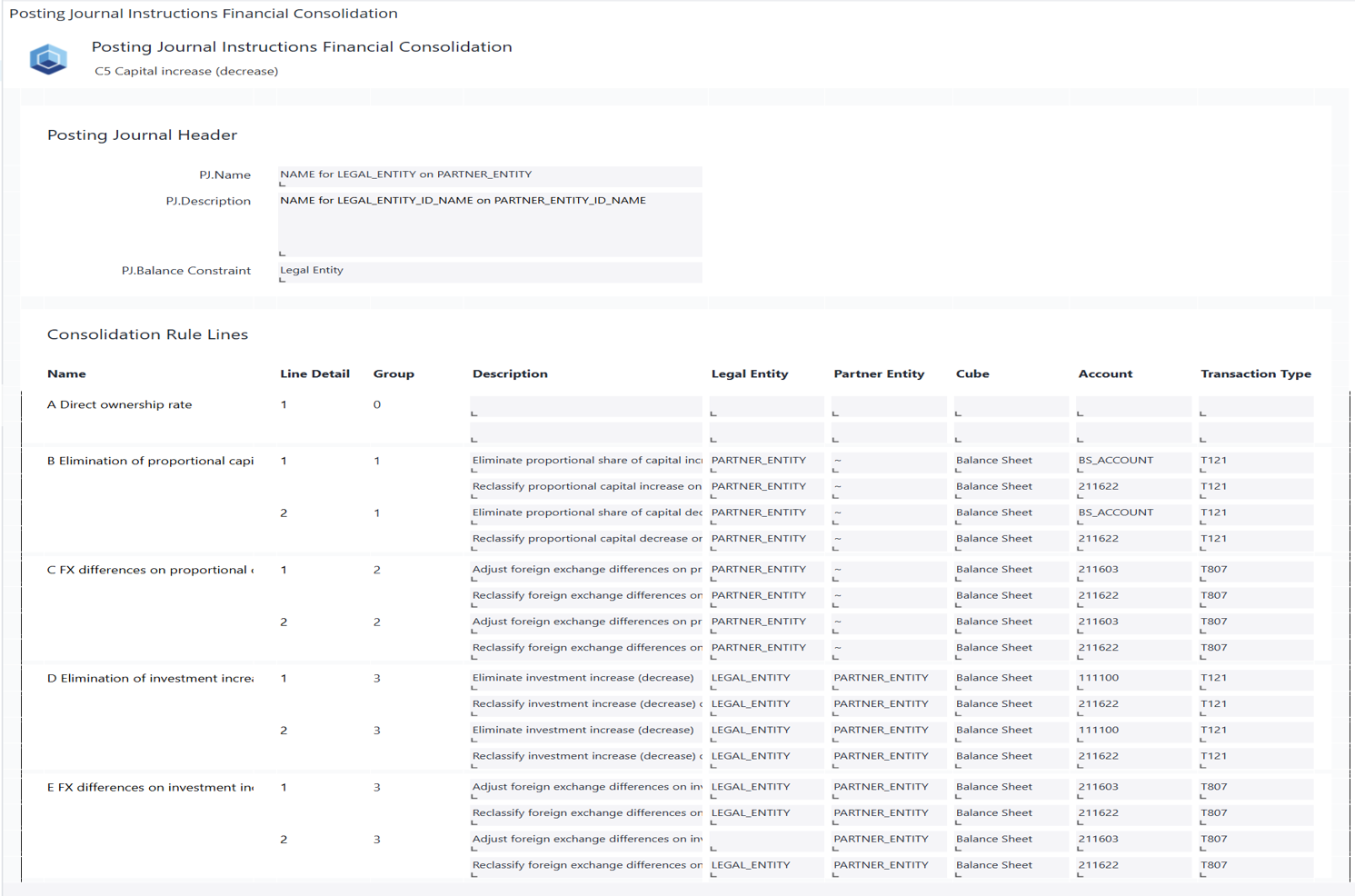
Configure Consolidation Rule C5
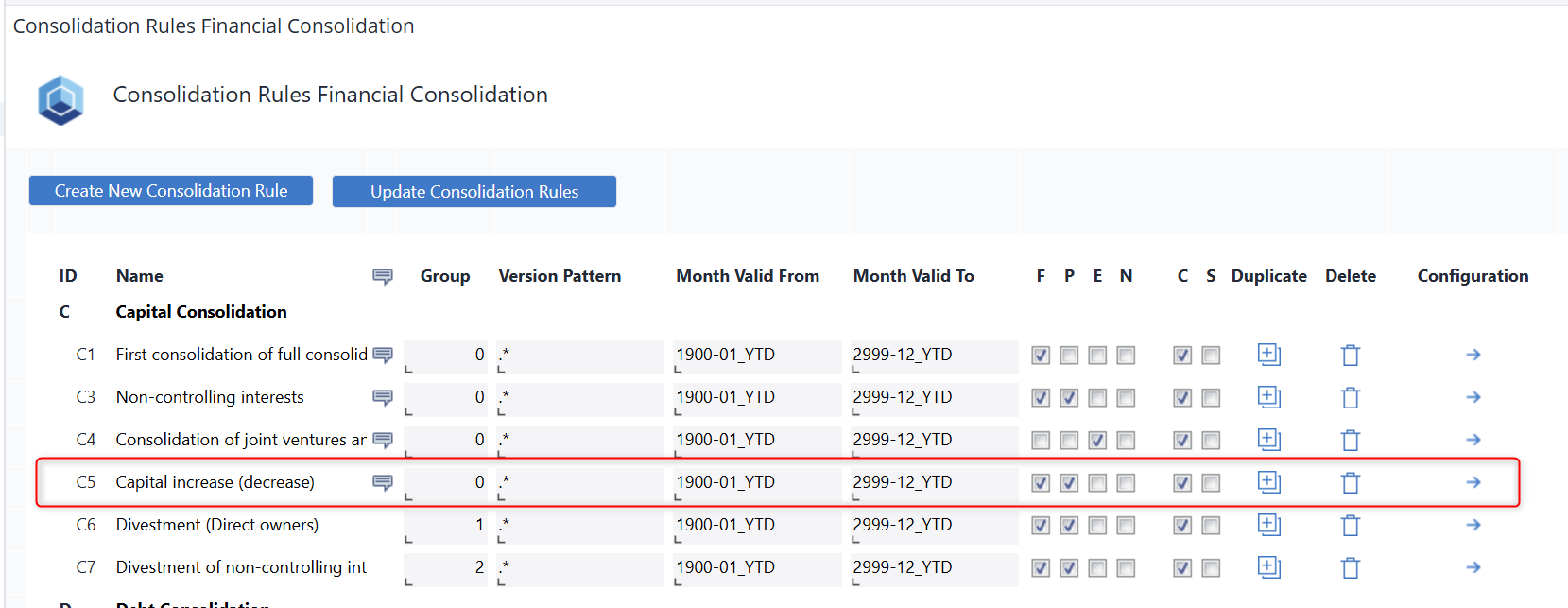
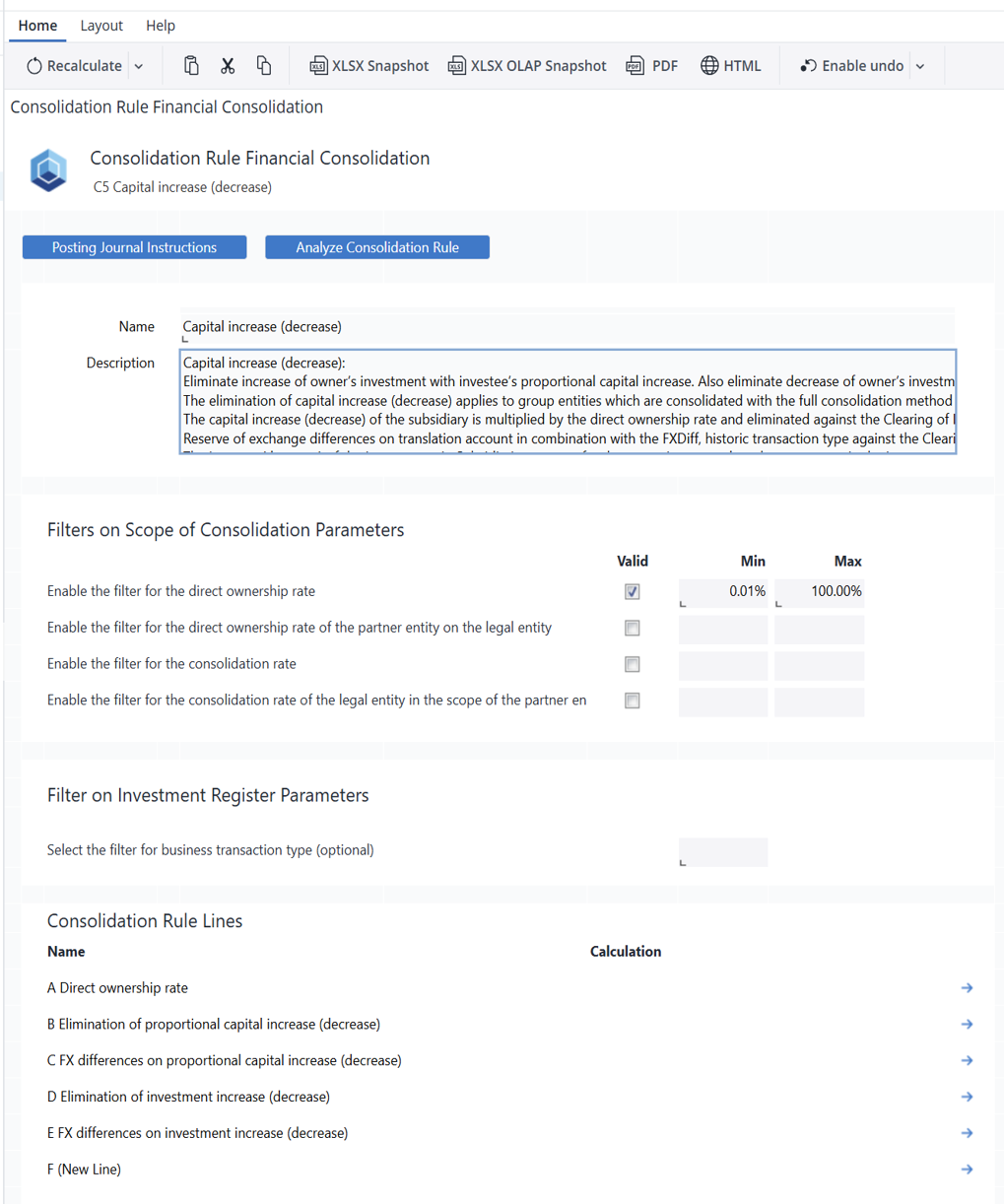
Rule C5 applies to fully consolidated group entities and is used to eliminate Capital Increase (Decrease) transactions between a direct owner (investor) and the investee, ensuring that intra-group equity movements do not distort consolidated financials.
From the investor’s perspective, any increase or decrease in the investment is eliminated and reclassified to the consolidation clearing account. Additionally, any foreign exchange differences resulting from the investment change are adjusted and also reclassified to the clearing account, ensuring that currency effects do not impact the consolidated equity balances.
From the investee’s perspective, the proportional share of the capital increase or decrease is eliminated and reclassified to the clearing account. Any related foreign exchange differences are similarly adjusted and moved to the clearing account. Furthermore, non-controlling interests (NCI) are updated proportionally based on the ownership structure, ensuring the correct allocation of equity among parent and minority shareholders. -
Detailed Configuration: Consolidation Rule C5
-
Posting Journal Instructions
-
-
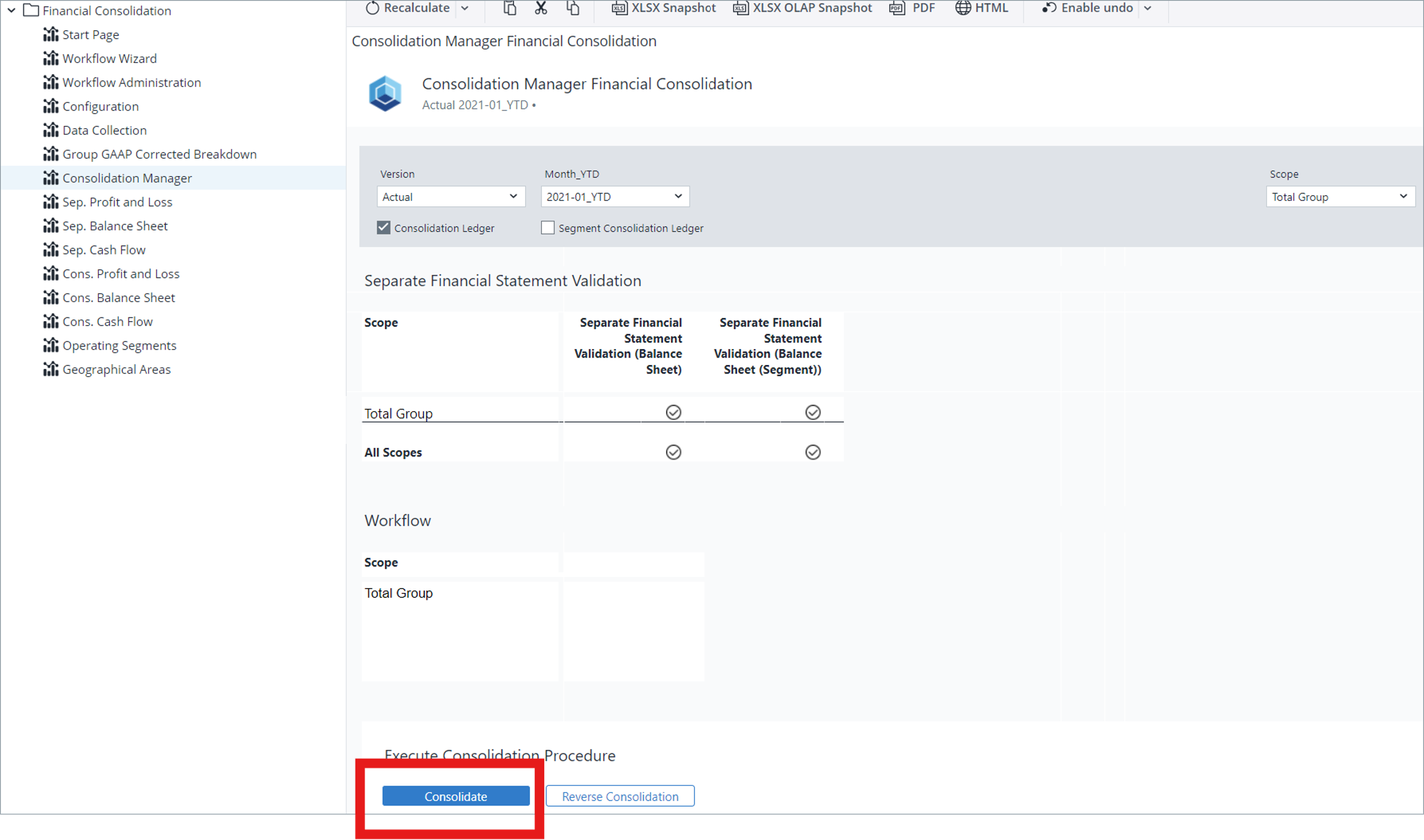
Performing the Consolidation
-
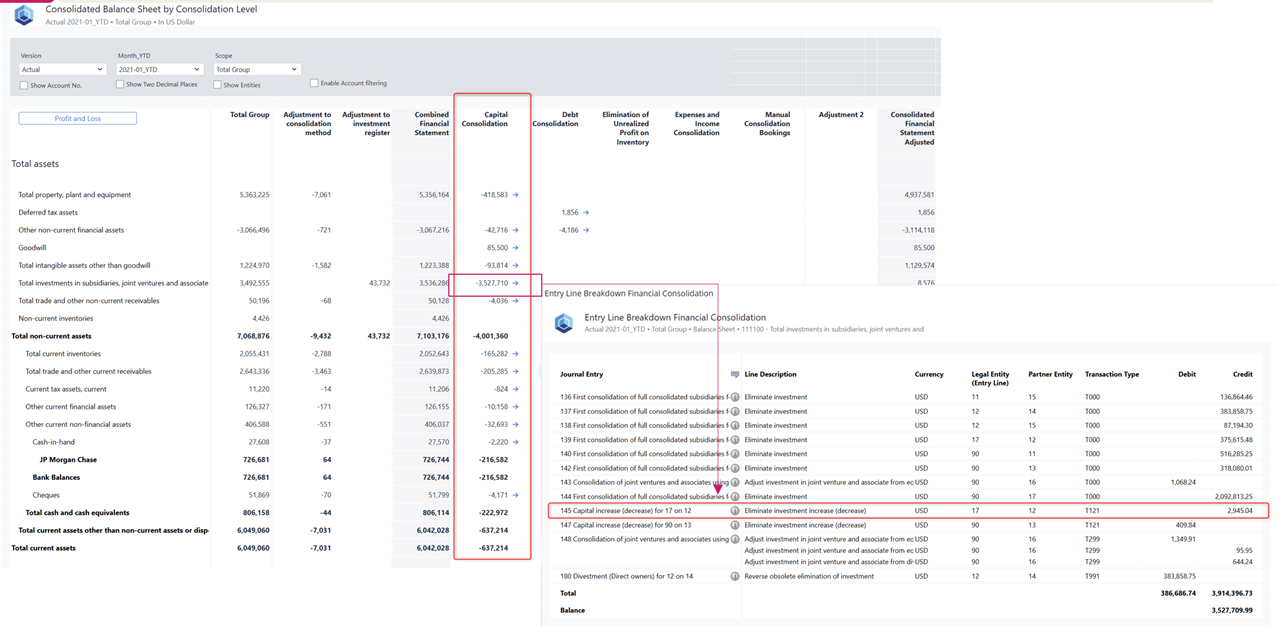
Verifying Results
-
Verify Posted Journals

-
Verify impact in Consolidated Balance Sheet
-
Updated October 2, 2026