Return to the Financial Consolidation Model Overview
Data validation and internal controls play a central role in ensuring data accuracy, completeness, and consistency in financial consolidation processes. In the Jedox Financial Consolidation model, validations are embedded directly into the application logic to automate checks, reduce manual review effort, and ensure reliable consolidation results.
This article explains what data validation is, how validation logic is applied in Jedox, how validations are implemented in the Financial Consolidation application, which cubes contain validations, and how validation results are displayed in reports.
What is data validation?
Data validations are automated checks built into the system to ensure that reported data is accurate, complete, and consistent with predefined expectations. These validations act as business logic controls and verify whether reported values make sense and comply with accounting rules, reporting standards, and organizational requirements.
Validation logic is implemented directly on cubes and evaluates relationships between data points. For example, validations can check whether totals balance correctly, whether required values are provided, or whether reported figures fall within defined tolerance limits. While many validations are delivered as part of the standard model, others can be configured or extended to meet organization-specific requirements.
Jedox Financial Consolidation has data validations for five cubes: Balance Sheet, Profit and Loss,Scope of Consolidation, Balance Sheet Segment, and Profit and Loss Segment cubes.
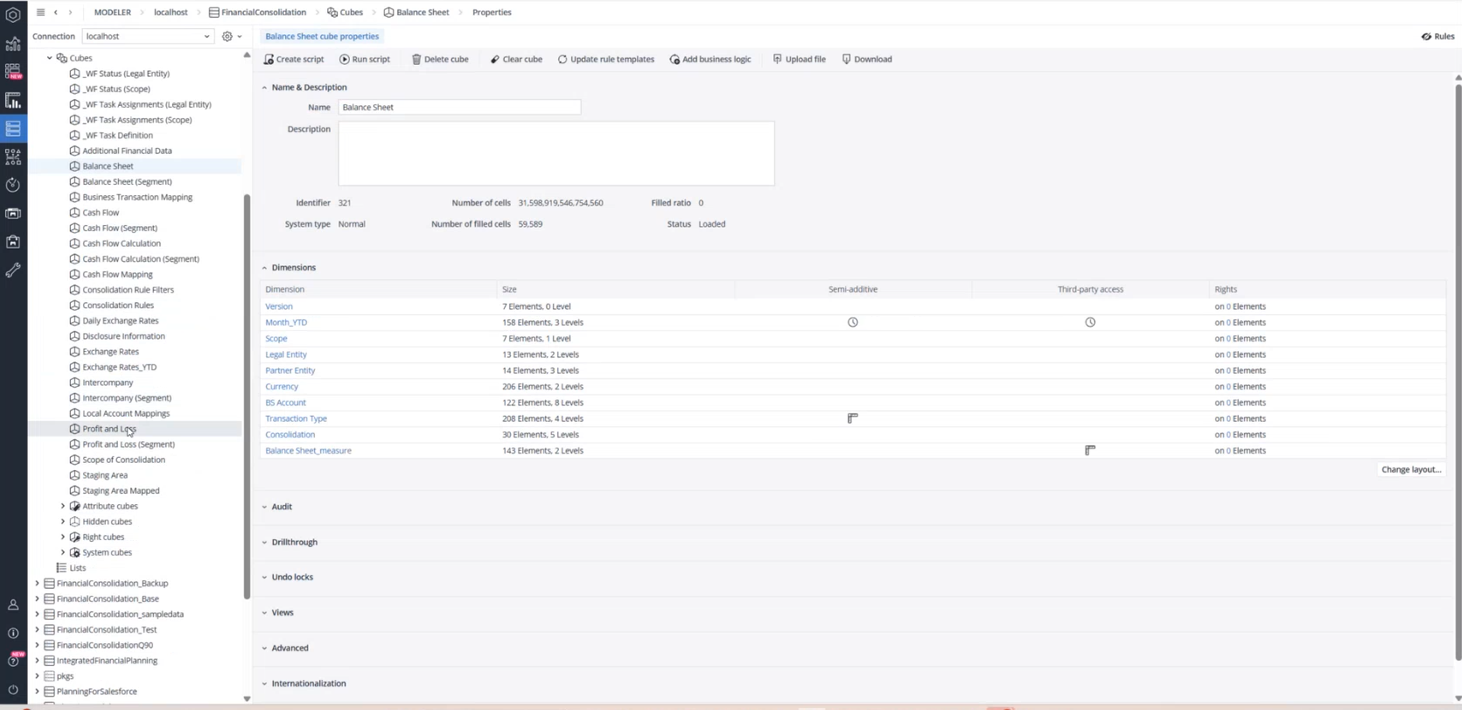
Data validations are evaluated using three rule templates, all stored in the Measure dimensions of the respective cubes.
-
Data Validation Calculation: Performs the logical check and produces a numeric result.
-
Data Validation Warning: Indicates a low-severity issue that informs the user about a potential inconsistency.
-
Data Validation Error: Indicates a high-severity issue that typically must be resolved before consolidation.
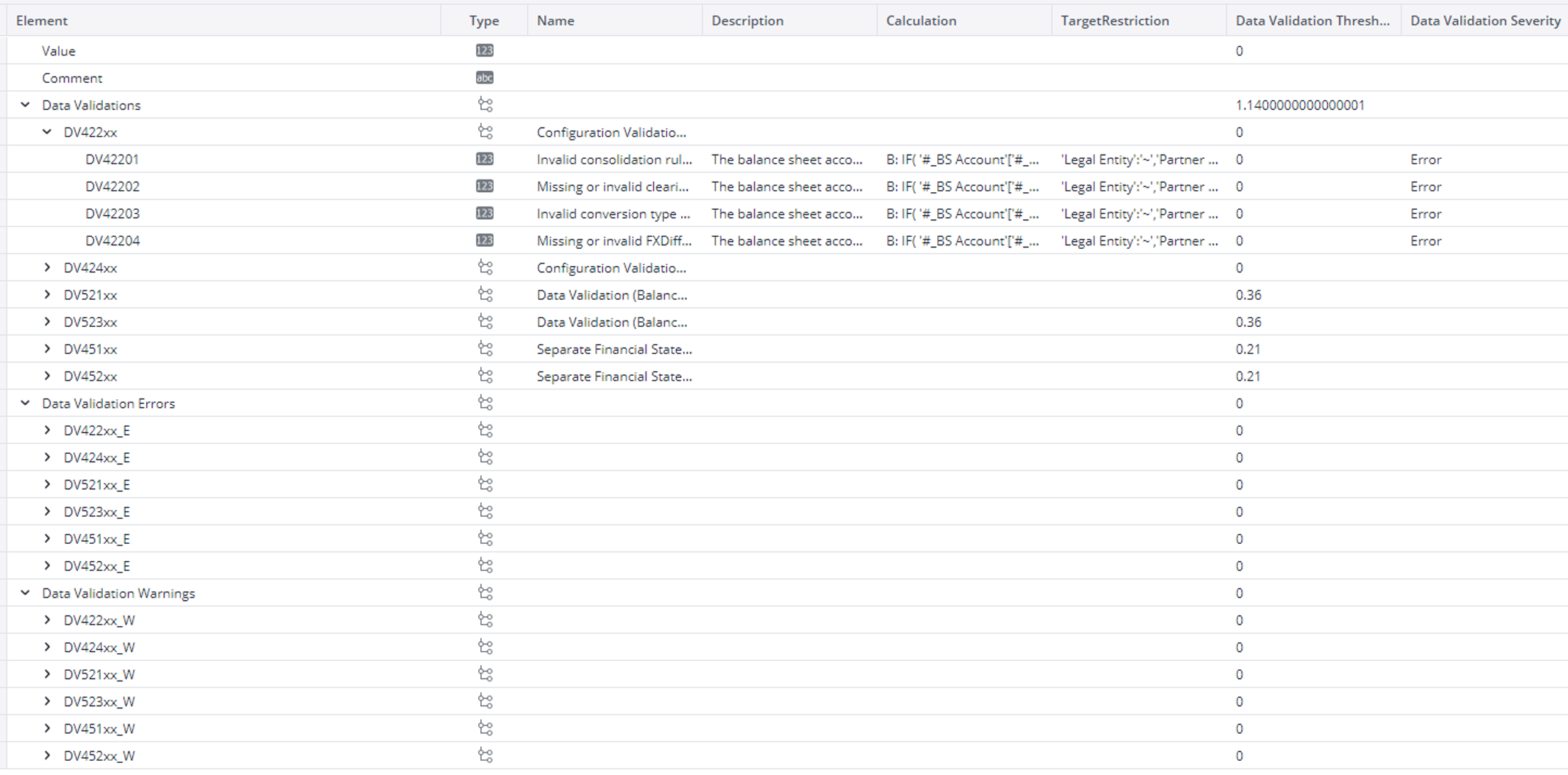
Each validation compares values or relationships and reports whether the data is correct, acceptable within tolerance, or incorrect.
A typical example is the validation of separate financial statements at the local GAAP level. Users can verify whether total assets equal total liabilities plus equity, ensuring that the statement is balanced before further processing. This is usually the primary validation check.
Additional validations may involve threshold-based checks. For example, users can define tolerance limits where deviations below a certain amount are ignored, deviations within a defined range trigger warnings, and larger deviations result in error messages. These thresholds can be configured according to organizational requirements. Based on attributes defined in the model, a validation result is classified as either a warning or an error. If a validation result exceeds an allowed threshold (for example, 0.1 or 0.2 cents), the system can display a warning for lower deviations and an error for higher deviations. These validations can be customized or extended to match each organization’s financial structure and reporting needs.
Benefits of Data Validation and Input Controls
Data validation enables users to identify issues at an early stage, without waiting for the full consolidation process to complete. Validations can be executed during initial checks, significantly reducing manual review effort. Without validation and input controls, users must often trace imbalances from consolidated levels down to base data, which is time-consuming and inefficient.
With data validation reports, users immediately see whether checks have passed, generated warnings, or resulted in errors. This improves data quality across the application, as validations are executed in every reporting period. When validation requirements are not met, issues can be identified and corrected early, ensuring that reporting needs are fulfilled consistently. In this context, data validations are also commonly referred to as input controls, as they verify balances, relationships, and reconciliation consistency.
Data Validations in the Jedox Financial Consolidation Model
In the Financial Consolidation Model, data validations are integrated into the workflow. They are executed during configuration, data collection, and validation of separate financial statements.
Within the Financial Consolidation application, validations are implemented for five key cubes: Balance Sheet, Profit and Loss, Scope of Consolidation, Balance Sheet Segment, and Profit and Loss Segment. These cubes contain the core financial and organizational data that must be validated before and during consolidation.
Validation Setup and Technical Structure
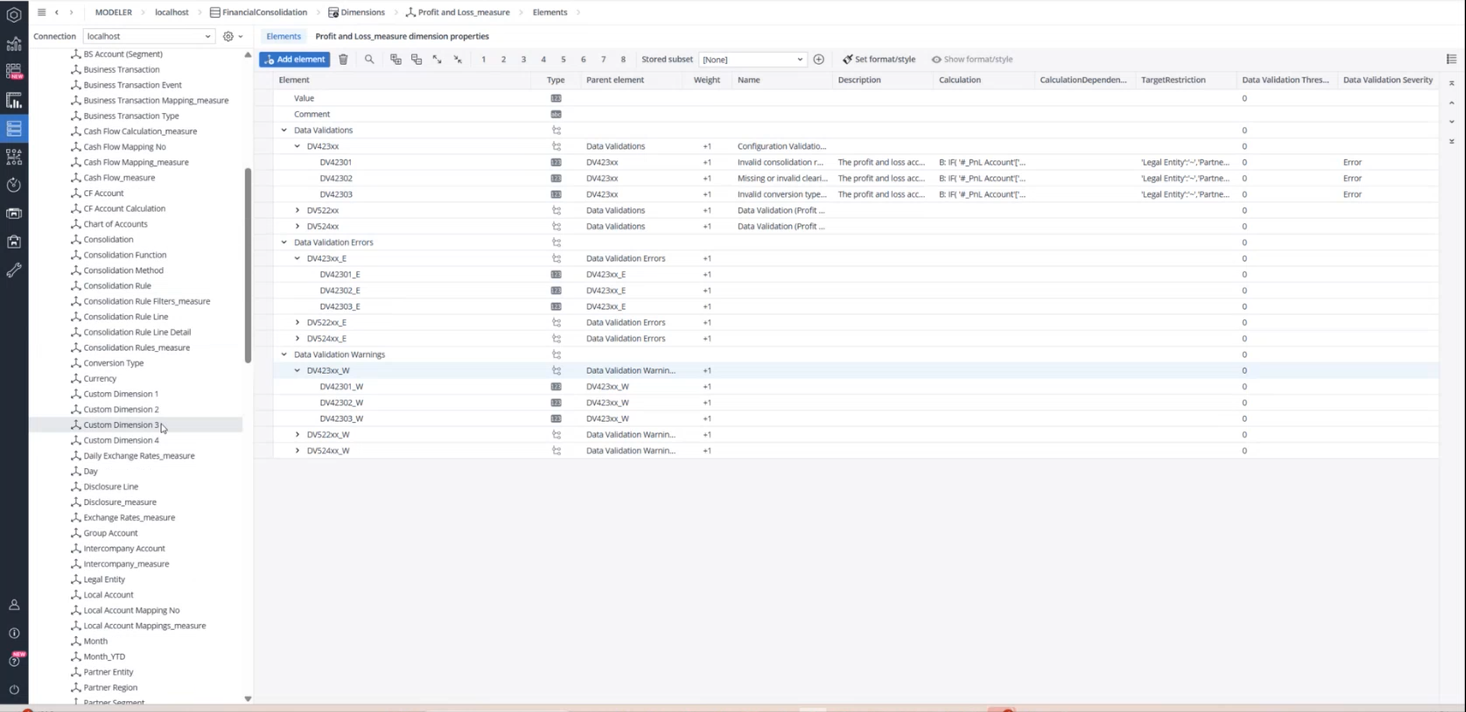
Validations are defined using the Measure dimension of the respective cubes. For example, the the Profit and Loss_measure dimension contains three distinct validation sets: Data Validations, Data Validation Errors, and Data Validation Warnings. This structure reflects that validations are embedded directly in the database as calculated measures.
The Scope of Consolidation_measure dimension also contains validations, but these focus on organizational and structural consistency rather than general finance logic. Typical checks include missing consolidation methods, missing direct ownership rates, or missing profit margins for specific legal entity and partner entity combinations.
Each validation rule is stored in the Calculation attribute, which defines the formula, the source accounts, and the calculation logic. The Description attribute contains the message that is displayed to the user when a validation is triggered.
Predefined and Configurable Validations
The Financial Consolidation Model includes approximately 53 predefined data validations across the Balance Sheet, Balance Sheet Segment, Profit and Loss, Profit and Loss Segment, and Scope of Consolidation cubes. Based on severity, each validation is classified as either a warning or an error.
High-severity issues that exceed defined thresholds are marked as errors, while lower-severity deviations are marked as warnings to inform users of potential issues without blocking further processing. All validation results are stored in the database and displayed in predefined web reports, allowing users to stay informed about failed checks.
Users can review validation results in the Configuration, Data Collection, and Consolidation Manager reports. For example, the Configuration Validation (Scope of Consolidation) report of the Configuration section displays validation results for structures such as the Total Group, Subgroup Americas, and Subgroup European Union, using data stored in the Scope of Consolidation cube.
For details on adapting validations to organization-specific account structures, users should refer to the Configurable and non-configurable Data Validations article. In particular, top-level accounts and consolidated elements often differ between organizations and must be adjusted to ensure correct calculation behavior in the Measure dimensions.
Interpreting Validation Results in Reports
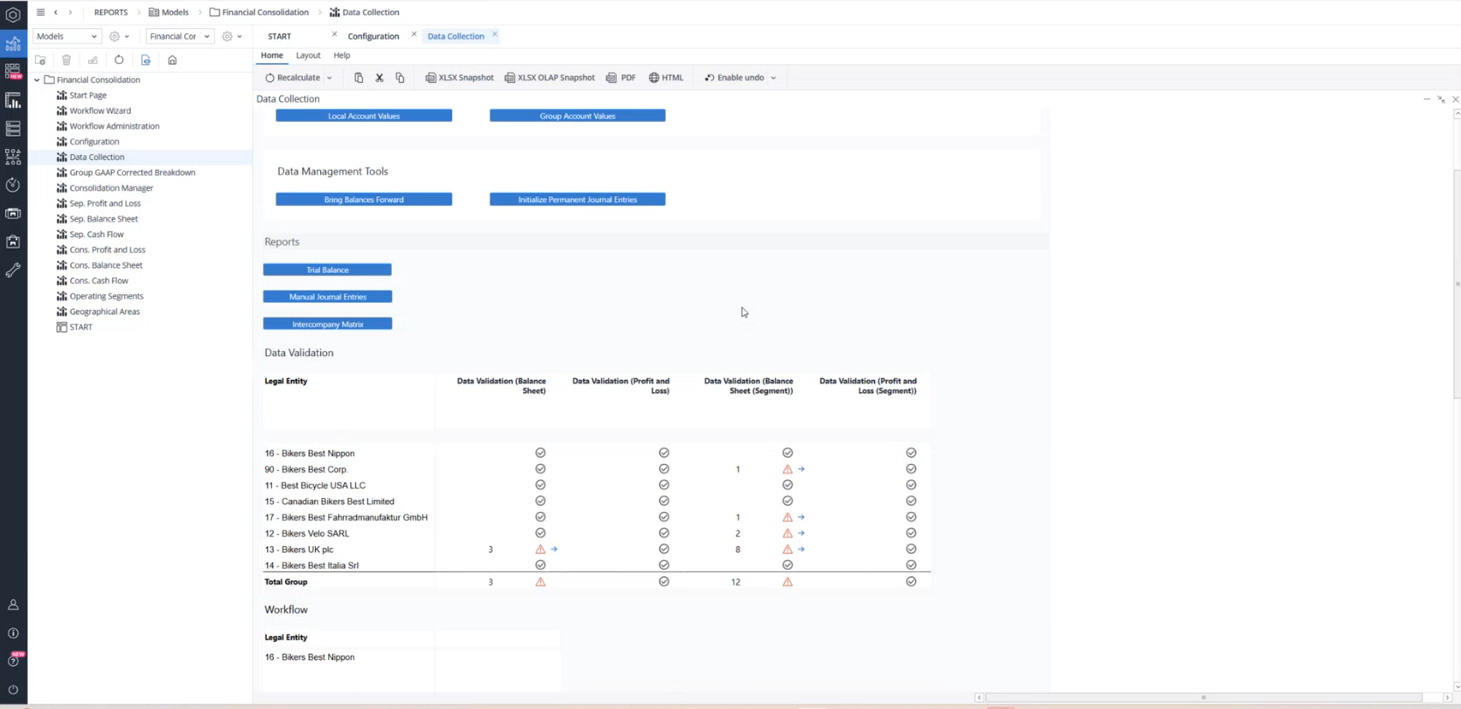
Validation outcomes are visually represented in key reports. A gray check mark indicates that a validation has passed successfully. A gray circle with an exclamation mark represents a warning, while a red triangle with an exclamation mark indicates an error. Each warning or error includes a blue navigation arrow that directs users to the exact data slice where values are missing, incorrect, or inconsistent.
Configuration validations focus on data consistency in the setup phase. Data Collection validations assess the accuracy of collected financial data. Separate Financial Statement validations ensure that company-level balances are correct before executing consolidation procedures.
Additional Input Controls in Key Reports
Beyond standard data validations, additional input controls are available in selected reports to support rapid identification and correction of issues.
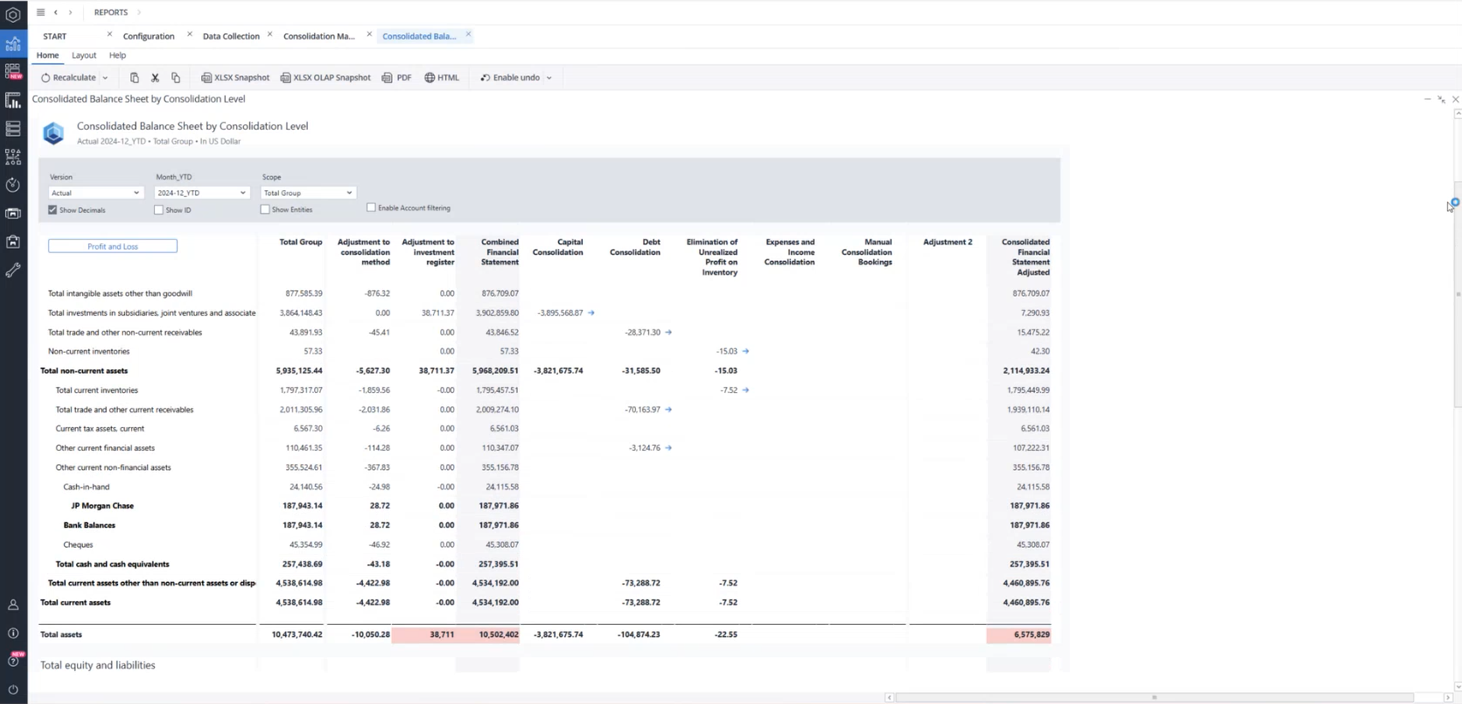
In the Consolidation Manager, for example, the “Consolidated Balance Sheet by Consolidation Level” report highlights imbalances directly within the report. When an imbalance exists at a specific consolidation level, affected cells are highlighted with a light red background, allowing users to quickly identify problem areas and take corrective action.
Known issues
The current version of Financial Consolidation displays certain "false positive" data validation failures. These failures occur because the data validation checks for opening balances at the start of the first reporting year, comparing these figures to non-existent closing balance data from the preceding year. These particular validation issues are categorized as warnings and can be safely disregarded.
Please be aware that this is a known issue and will be addressed in a future update.
Updated October 5, 2026