Return to the Financial Consolidation Model Overview
Setting up consolidation rules is essential for ensuring that financial values from individual entities transition accurately and consistently into the consolidated group results. The goal of these rules is to create uniformity across the group, both in terms of value aggregation and currency translation, so that all consolidated outputs reflect a coherent financial picture. Consolidation rules work in combination with the Consolidation dimension, which can be accessed through Modeler → Dimensions → Consolidation. In this dimension, each legal entity contains values that originate at the Local GAAP level, representing figures taken directly from the separate financial statements of each subsidiary.
Understanding the role of consolidation methods
The consolidation rules operate based on the consolidation method assigned to each entity in the Scope of Consolidation cube. Users define whether an entity is consolidated using the full method, partial method, equity method, or end consolidation method, depending on its ownership percentage, control, and voting rights. When an entity is assigned the N consolidation method or equity consolidation method, its values must not contribute to the group totals. As part of the consolidation process, these values are negated and removed from the relevant group statements. This negation is visible in the “Adjustment to consolidation method” column. Once these adjustments are completed, the remaining values accumulate into the Combined Financial Statement (Calculated), expressed entirely in group currency or in any additional reporting currency defined by the organization.
Investment Register and additional adjustments
The consolidation process also involves two additional adjustments that may not be visible directly on standard reports but exist within the underlying consolidation structure. One of these is the Investment Register, which serves as the model’s dedicated storage area for all investment-related transactions recorded from the group’s perspective.
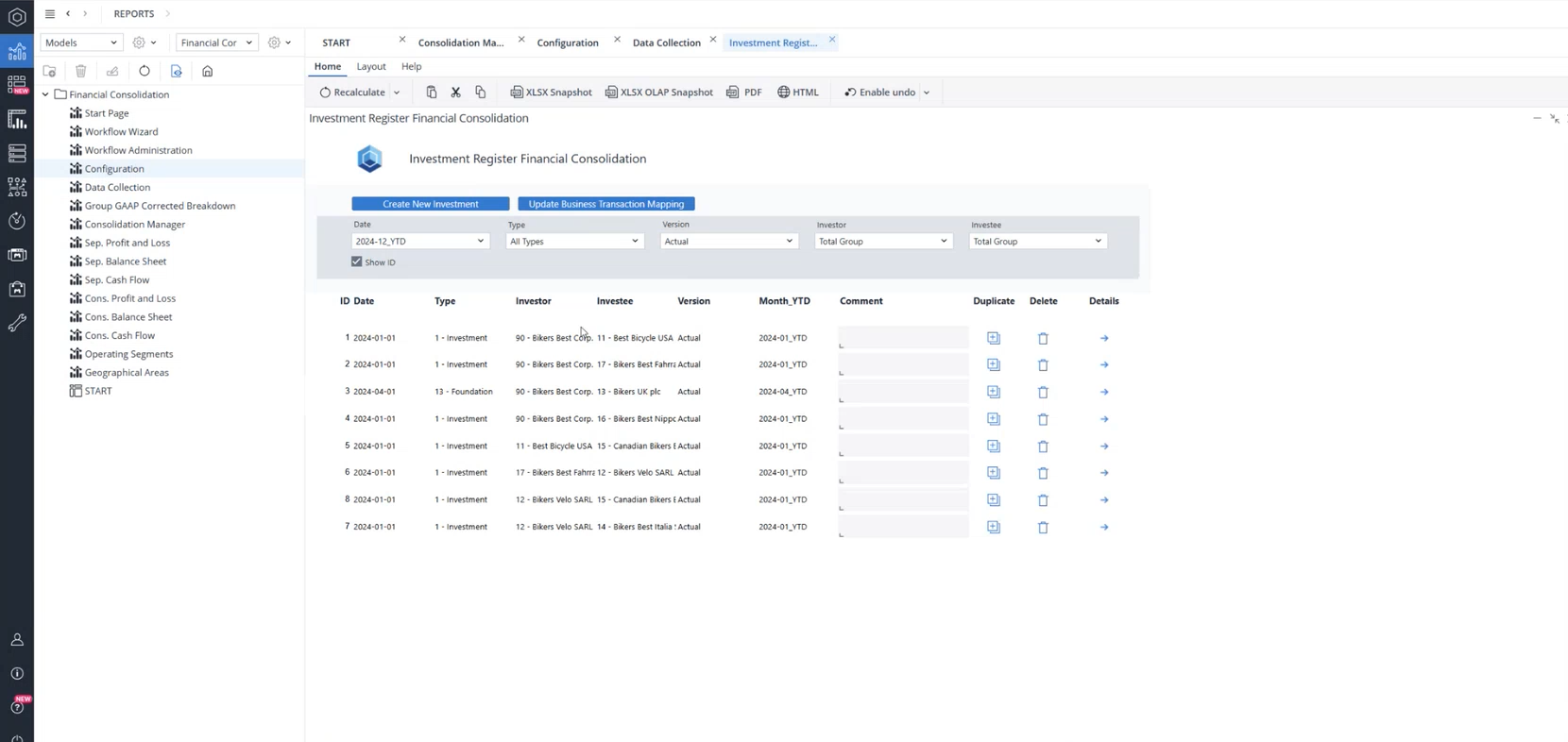
Users can record investments, divestments, and capital increases or decreases, and these entries are stored in the Additional Financial Data cube.
In the Investment Register, by clicking on the "details" button in front of each line, users also define the consolidation method, the updated ownership rate, and the corresponding values in group currency or any additional reporting currency.
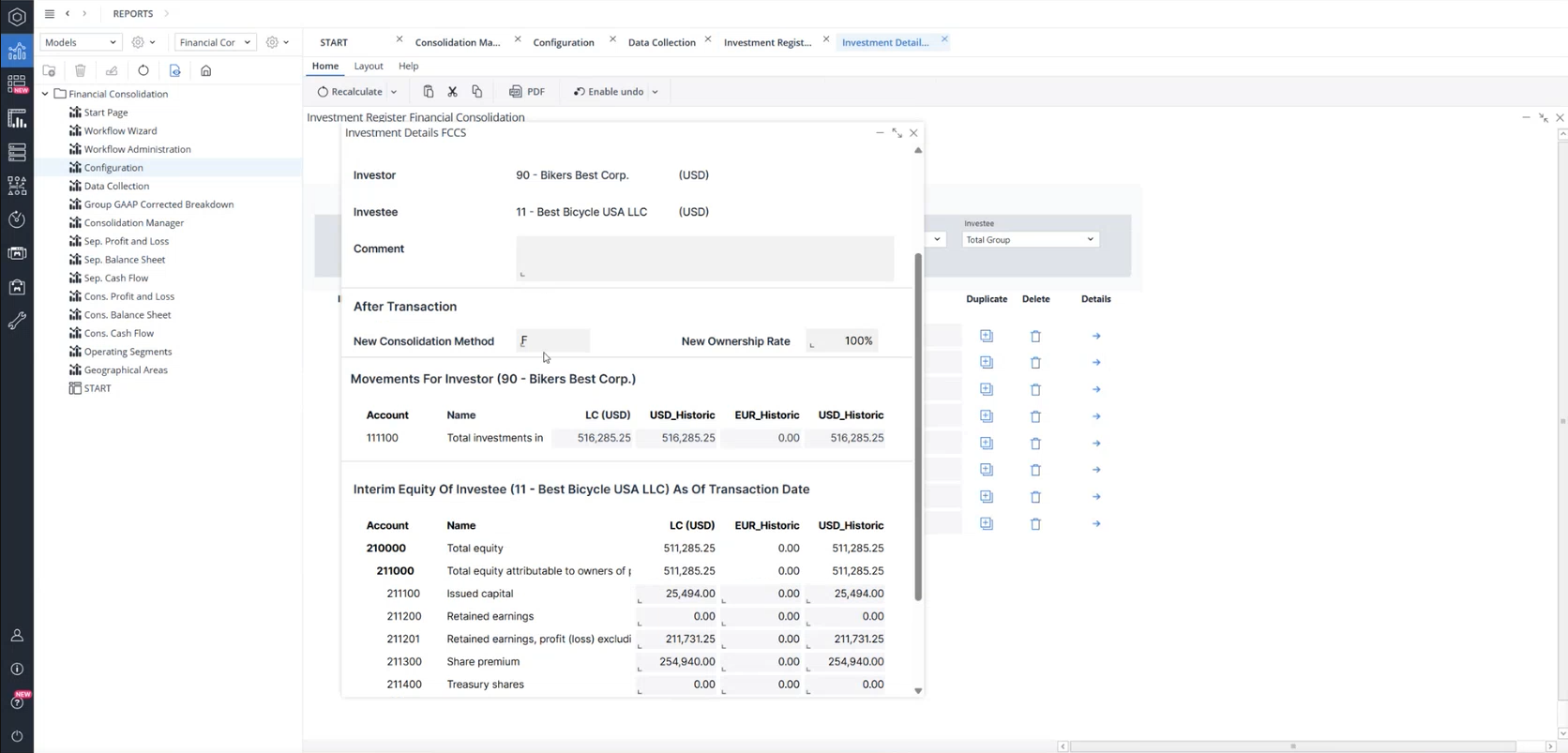
When consolidation is executed, these values are taken into account and integrated with the rest of the consolidation logic.
Within the Consolidation dimension, the model performs elimination of internal investments, replacing values originating from separate financial statements with those defined in the Investment Register. This affects both investment accounts and the relevant equity accounts. Although these operations do not immediately appear as posting journals, any differences arising from these eliminations can be seen in the Consolidated Balance Sheet by Consolidation Level, allowing users to track how each investment is reconciled across the group.
Transition to the Combined Financial Statement
After Local GAAP values undergo adjustments, the resulting figures move into the Combined Financial Statement and are translated into group currency or additional reporting currencies to the Combined Financial Statement (Calculated) level. At this point, the configured Consolidation Rules take effect. These rules are managed under Configuration → Consolidation Rules.
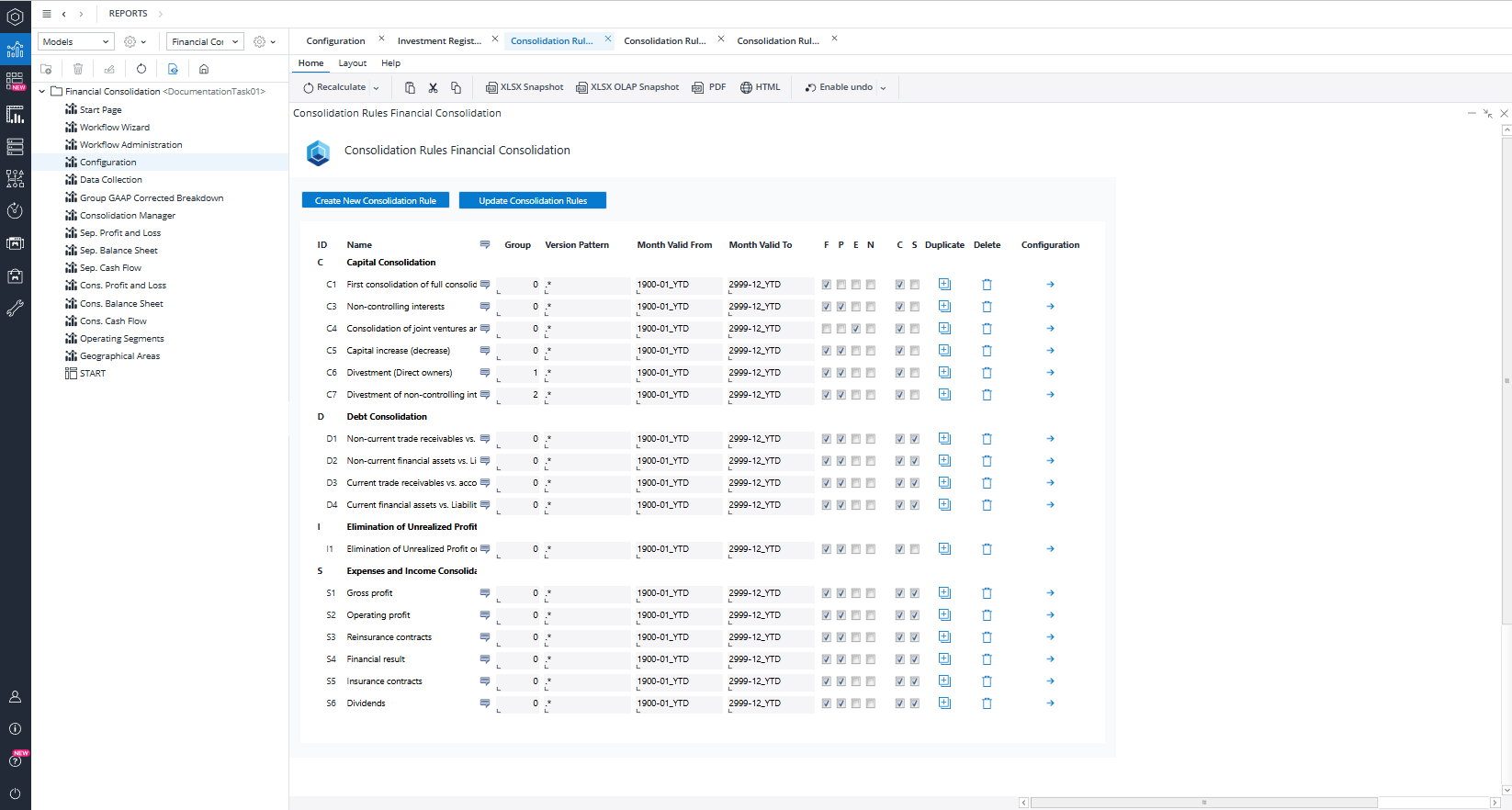
The first major rule, C1: First consolidation of fully consolidated subsidiaries, illustrates how consolidation rules operate. For entities consolidated using the full method, this rule ensures that the investor’s investment is eliminated against the investee’s proportional equity. At the same time, the model calculates and records goodwill. The rule applies to all entities consolidated through the full method and ensures that capital consolidation is performed consistently for all direct parent–subsidiary relationships.
Filters and Calculation Lines Within Consolidation Rules
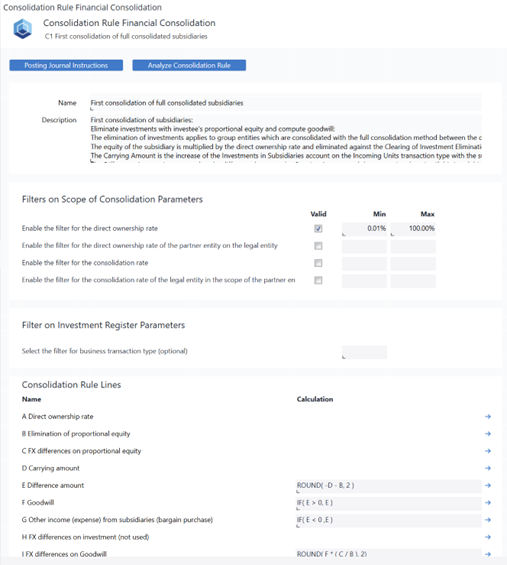
Every consolidation rule contains a series of filters that determine which entity pairs fall into the rule’s scope. These filters rely heavily on values stored in the Scope of Consolidation cube, such as the direct ownership rate and the consolidation rate.
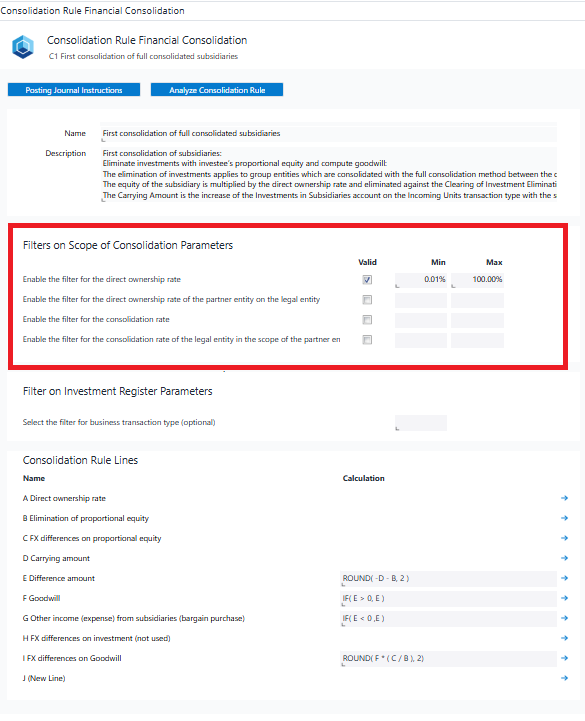
To eliminate the direct ownership rate, you need to enable the filter for this variable. The parameter ranges from 0.01% to 100%. Within this range, there are various payers with both ownership and direct ownership rates, all of which fall under this rule.
Consolidation rules also contain calculation lines, each representing a step in the consolidation logic.
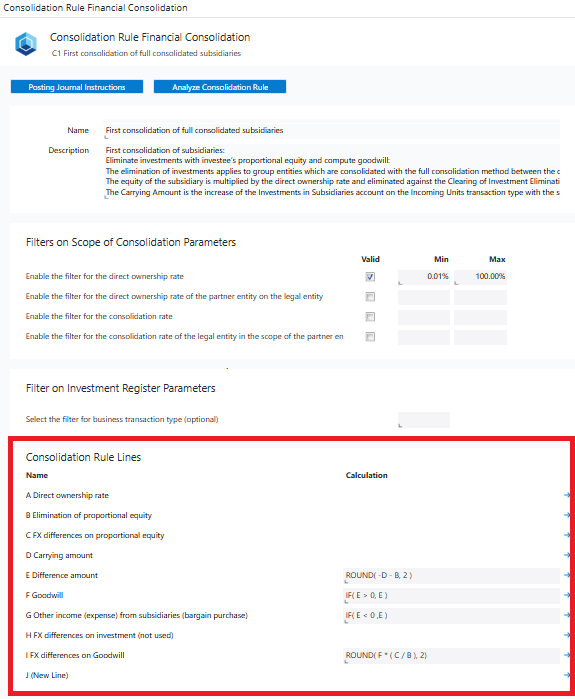
Every rule line then defines how the model should compute the required values. In the “A – Direct ownership rate” line, the rule retrieves the direct ownership rate from the Combined Financial Statement. The “B – Elimination of proportional equity” line eliminates the proportional equity based on a dedicated consolidation function (PEQ), which handles the elimination of equity for the specific pair. The values used in these calculations come from the Combined Financial Statement, as this is the level at which all prior consolidation stages (Local GAAP through Combined Financial Statement Calculated) have already been aggregated. The subsequent line C compute the FX differences on proportional equity, using the consolidated element, its child accounts, and the proportional factor for all partner entities. Conversion moves from historic to month-end rate, and the resulting difference is posted to a designated FX difference account. These calculations use values from the Combined Financial Statement Calculated to ensure consistency across all consolidation stages.
Each line can either derive its value from the previous line and perform calculations, or it can directly source it from a specific account at a given consolidation level for the calculation.
Additional calculation lines such as F – Goodwill, G – Other income (expenses) from subsidiaries (bargain purchase), H – FX differences on investment (not used), and I – FX difference on goodwill are all computed as part of the first consolidation rule. Once all values have been computed, the rule provides automated posting journal instructions. These instructions specify the legal entity against which the posting should be made, the partner entity, the cube where the entry should be stored, the account (such as a Balance Sheet or PnL account), and the transaction type used. Each rule contains a clearing or plug account to ensure that all postings result in a balanced financial statement. Each consolidation rule contains a clearing or plug account to ensure that the postings result in a balanced output.
Using the Analyze Consolidation Rule report
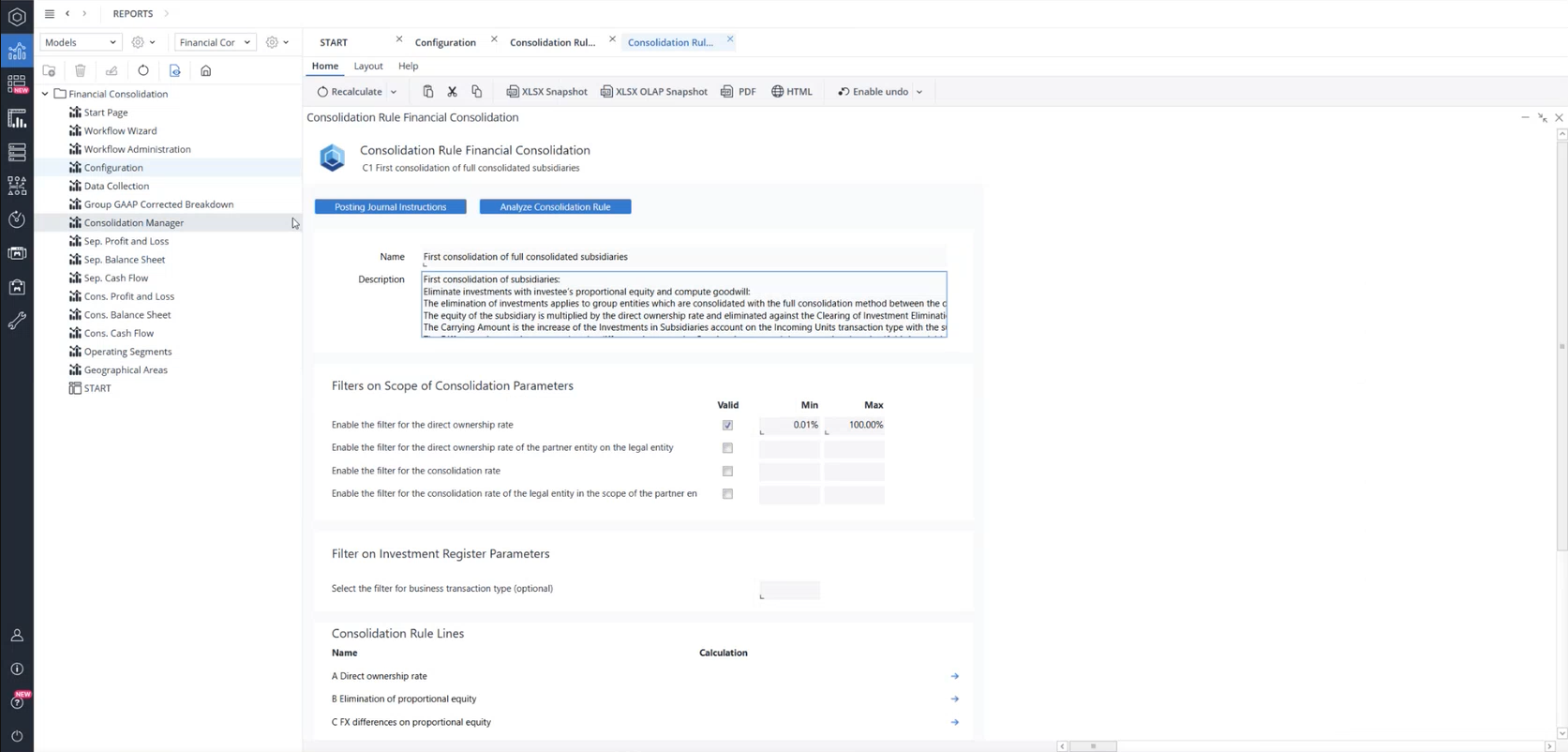
Since predefined rules might not address every organization’s industry-specific requirements, Jedox provides the Analyze Consolidation Rule report. This report allows users to preview the calculation result of each rule line, including source account number, transaction type, consolidation dimension element, and calculated values, before executing the consolidation process.
It clearly shows where values originate, what consolidation function is applied, and how the results will be journaled. Organizations with industry-specific needs can use this report to modify existing rules or design new rules tailored to their consolidation logic. There are eight capital consolidation rules, each with a specific purpose. Understanding how filters, calculations, and posting instructions interact is essential for configuring rules successfully. Users may analyze these details either in the dedicated report or in the main Consolidation Rules interface.
Debt Consolidation Logic
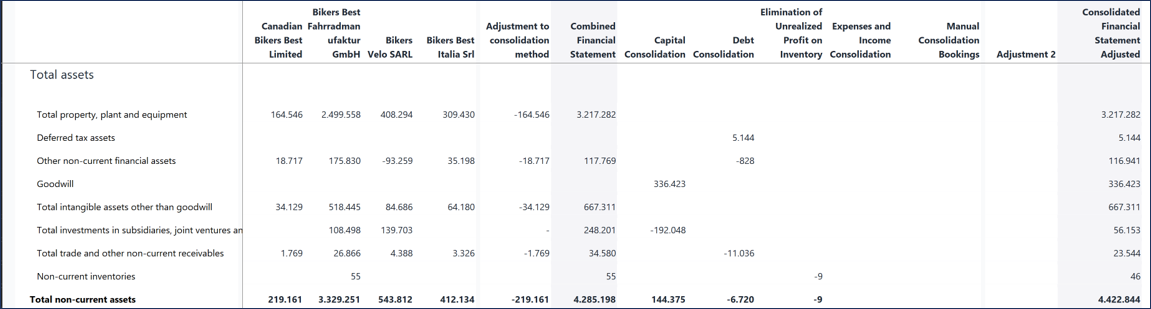
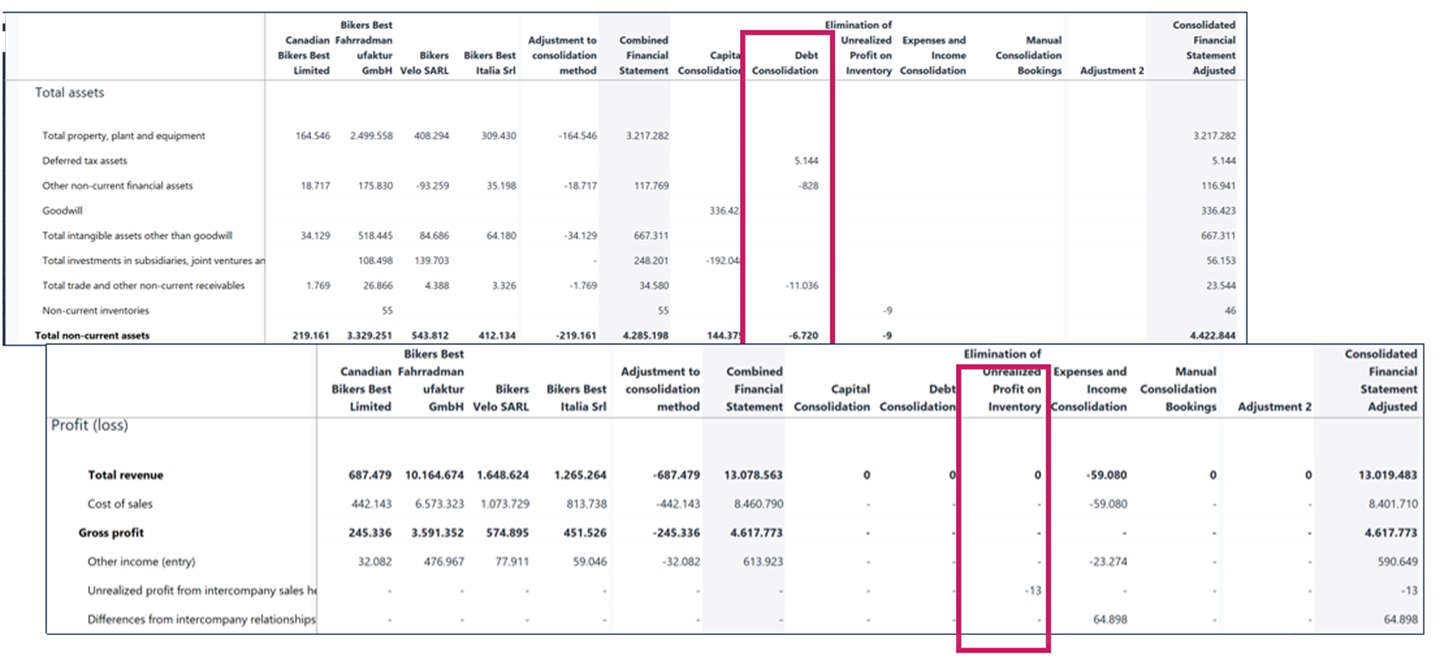
The next major consolidation area is Debt Consolidation. In the Consolidated Balance Sheet by Consolidation Level, the Debt Consolidation column shows how the model recognizes existing values, such as deferred tax assets, while eliminating intercompany balances like non-current financial assets, non-current trade receivables, and other intra-group receivables and liabilities. The model includes four standard debt consolidation rules: Non-current trade receivables vs. accounts payable, Non-current financial assets vs. liabilities, Current trade receivables vs. accounts payable, and Current financial assets vs. liabilities. Users may choose to eliminate or recognize these values depending on group requirements.
Eliminating Unrealized Profit
Another important consolidation process is the elimination of unrealized profit. In this step, the model eliminates the intercompany revenue together with the related inventory cost of the transaction and then adjusts for deferred tax assets or deferred tax liabilities based on the year-end closing value.
For this rule to work, the model first needs the profit margin between the legal entity and its partner entity. This value is stored in the Scope of Consolidation cube and retrieved using the PMX filter (Line A – Profit margin). After identifying the profit margin, the model determines the unrealized profit (or loss) in inventory (Line B) by using the consolidation function BSRNDiv, which reads the inventory values on the relevant transaction type and applies the recorded profit margin.
The rule also calculates the unrealized profit (or loss) on the seller (Line C). To determine the tax impact of these eliminations, the model reads the tax rate of the legal entity (Line D), which is also maintained in the Scope of Consolidation cube. Using Lines A through D, the model computes deferred tax assets (Line E) and deferred tax liabilities (Line F) as part of the same rule.
All calculated values are then transferred into automated posting journal instructions. For example, Line B generates postings for unrealized profit in inventory, Line C adjusts the seller side, and Lines E and F record the corresponding deferred tax effects. These postings ensure that internal profit in inventory is removed from the consolidated financial statements and that all related tax effects are reflected correctly.
Income and Expense Consolidation
Income and expense consolidation eliminates intercompany revenues and the related costs to ensure that the PnL statement reflects only transactions with external parties. The model includes several consolidation rules for this purpose, including S1 (Gross profit), S2 (Operating profit), S3 (Reinsurance contracts), S4 (Financial result), S5 (Insurance contracts), and S6 (Dividends). Most rules remove intercompany revenues and associated costs. In the case of S6 Dividends, the model retrieves dividends from the Group GAAP corrected level because dividend postings use transaction type T112, which is defined with a historic conversion type. This ensures that dividend eliminations reflect the correct translation logic.
Sequence of rule execution and system validation
All consolidation rules in the Financial Consolidation model are executed in a fixed sequence when the user selects Execute Consolidation. This sequential processing ensures that investment eliminations, debt eliminations, profit eliminations, and FX computations flow correctly through all consolidation stages.
Throughout the consolidation process, Jedox performs several built-in validation checks on major reports (most importantly, the Consolidated Balance Sheet by Consolidation Level.) If an imbalance is detected, the system highlights the relevant cell in light red. Users can verify that all Balance Sheet and PnL items balance at each stage and confirm that no intercompany transaction remains unresolved. The same principle applies to the Consolidated Profit and Loss by Consolidation Level report, providing additional validation that ensures accuracy and auditability.
Producing the final Consolidated Financial Statement
After all eliminations—covering capital consolidation, debt consolidation, unrealized profit adjustments, and manual corrections—Jedox produces the final consolidated financial statement. This statement represents the true financial position of the group, free from duplication and internal inconsistencies. All subsidiaries are presented under a unified accounting framework, and every value remains fully traceable—from Local GAAP through each consolidation level. While a significant part of the process is automated, Jedox maintains full transparency, allowing users to audit every step and verify the logic behind all consolidation results.
 Capital Consolidation most frequently asked questions
-
How do I determine the number of shares held by the shareholder?
-
Use of unique share accounts or partner information.
-
-
How do I determine the subsidiary's equity at the time of initial consolidation?
-
Information cannot be determined from current financial statements; it must be included in the documentation of the previous consolidation of investments.
-
-
How do I fix the historical rates?
-
Information cannot be determined from current financial statements; it must be included in the documentation of the previous consolidation of investments.
-
-
How do I determine the third-party shares?
-
Determination possible at any time on the reporting date of the financial statements, no documentation required in the past.
-
-
What happens to the differences?
-
As a rule, an attempt is first made to uncover hidden reserves, and the remainder is then capitalized and amortized as goodwill (HGB) or valued annually (IFRS).
-
Debt Consolidation most frequently asked questions
-
What has to be included? Can everything be accounted for in one step or in separate steps?
-
Loans, Receivables/receivables Offsets/receivables Loans, Prepaid expenses and deferred charges, Accruals, Liabilities/payables Offsets/payables Loans, Accrued expenses and deferred income
-
-
What are the possible reasons for differences?
-
Currency differences, Temporary accounting differences, Value adjustments, Goods in transit, Incorrect reporting
-
Expenses and Income Consolidation most frequently asked questions
-
What has to be included? Can everything be accounted for in one step or in separate steps?
-
Revenue and cost of materials, Other sales and other operating expenses, Interests, Profit and loss transfer agreement, Personnel charges, Income from investments
-
-
What reasons can there be for differences?
-
Currency differences, Temporary accounting differences, Value adjustments, Goods in transit, Incorrect reporting
-
Updated May 19, 2026