This article provides guidance on key aspects of working with Virtual Dimensions, including recommended naming conventions, how Jedox handles invalid attribute values, and important considerations to keep in mind when integrating Virtual Dimensions into your models and reports.
Naming conventions for Virtual Dimensions
When using an attribute as a Virtual Dimension, all attribute values should follow the same naming restrictions as dimensions and elements.
Any invalid attribute value, e.g., system reserved names like "Total <attribute>" and "No <attribute>", or attribute value with leading and trailing spaces, becomes a part of the "No <attribute>" node in a Virtual Dimension.
Note that the name of a Virtual Dimension cannot be the same as the name of a base element in the dimension itself. Enabling the Virtual Dimension means (virtual) elements are created from the values for that attribute. If some attribute value is exactly equal to the element name of a base-level element in the actual dimension, you would have two elements with the same name, and this is not possible.
"Invalid <attribute>" in Virtual Dimensions
Attribute values that go against general element naming rules (for example, starting or ending with a space character) or are matching reserved element names ("Total <attribute>", "No <attribute>") are categorized under the "Invalid <attribute>" node in the Virtual Dimensions. This helps you find the affected elements more quickly and take the required actions, e.g., changing the attribute value.
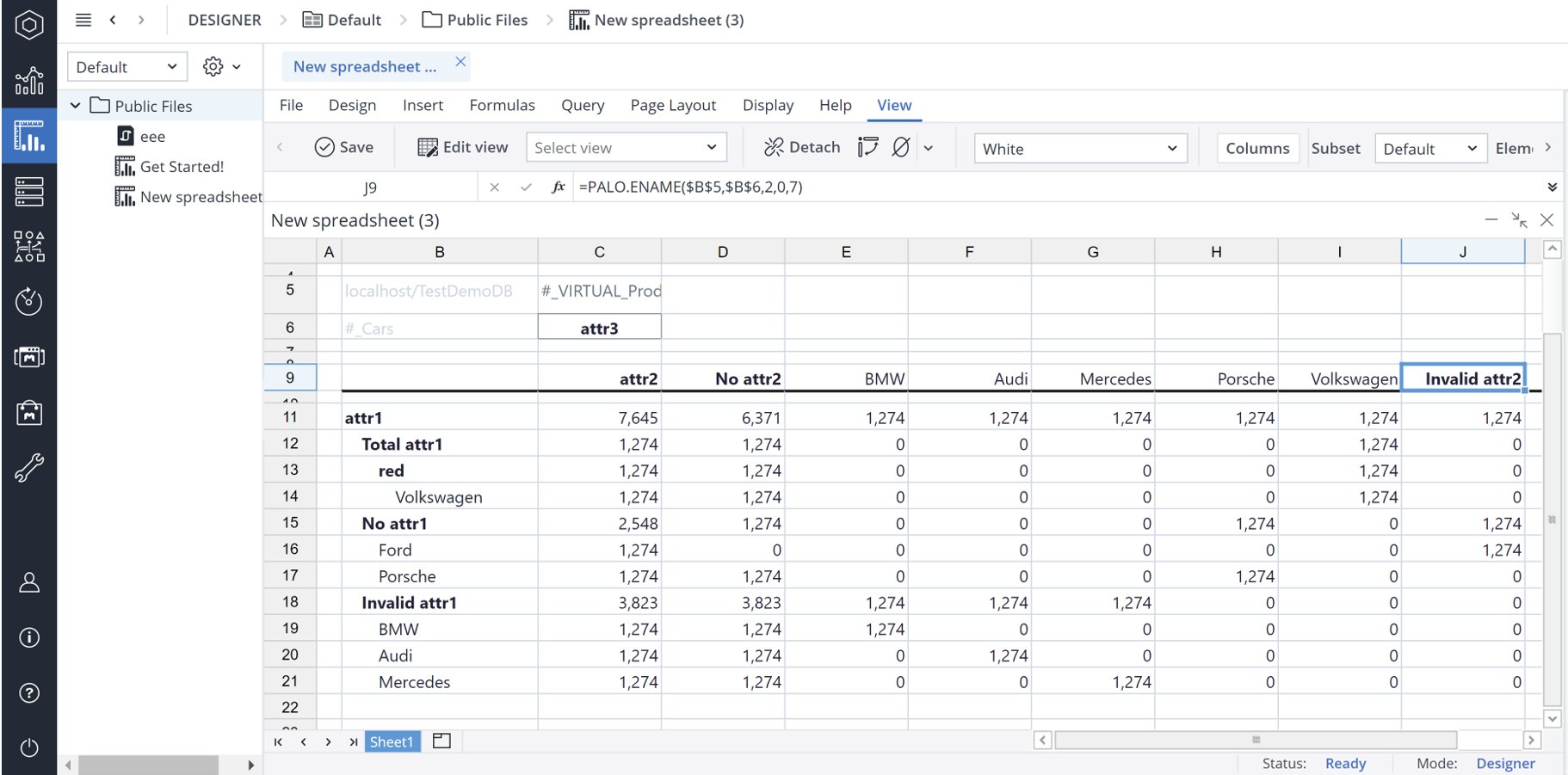
Considerations when using Virtual Dimensions
-
Virtual Dimensions are system-generated and cannot be edited manually. This means you cannot create a customer hierarchy in a Virtual Dimension. If it is required to do so, create a normal dimension for this functionality.
-
Virtual Dimensions are only built from attributes of type 'string'. Numeric attributes cannot be used for Virtual Dimensions.
-
Virtual Dimensions can only be built upon the base level elements. Consolidated element attributes cannot be used in a Virtual Dimension.
-
Virtual Dimensions are also supported in DynaRanges.
-
For optimization and performance improvement, Virtual Dimensions use multicore aggregation in virtual cubes.
-
If an attribute value is empty for a specific base level element, it is grouped under "No [attribute name]".
-
Currently combining Virtual Dimension data and semiadditive measures (Average, First, and Last) is not supported. When viewing data on an element in a Virtual Dimension, it will always aggregate the sum of the children, even if the cube cell coordinates also include an aggregated element from the regular dimension which is set to calculate using semiadditive.
-
Virtual Dimensions cannot be used in a rule explicitly, that is, they cannot be part of the rule definition. However, when rules are defined in a cube where Virtual Dimensions are active, they behave as every dimension would do, if it is not explicitly defined in a rule.
-
Rule-calculated attributes are not resolved when used in a Virtual Dimension. Only physically stored attribute values are used.
-
Aggregation functions (Sum, Minimum, Maximum, or Average) for multiple selected elements in the Paste View Dialog are currently not supported for Virtual Dimensions.
Updated March 30, 2026